Some workspaces see Memory in the sidebar instead of Knowledge. It holds the same idea in a shorter form: Mini’s memory, one text Mini reads before every run, and a Glossary of your app’s own terms. What this page says about writing knowledge applies there too, in that one text.
Test suite → Knowledge.
What Mini knows before it starts
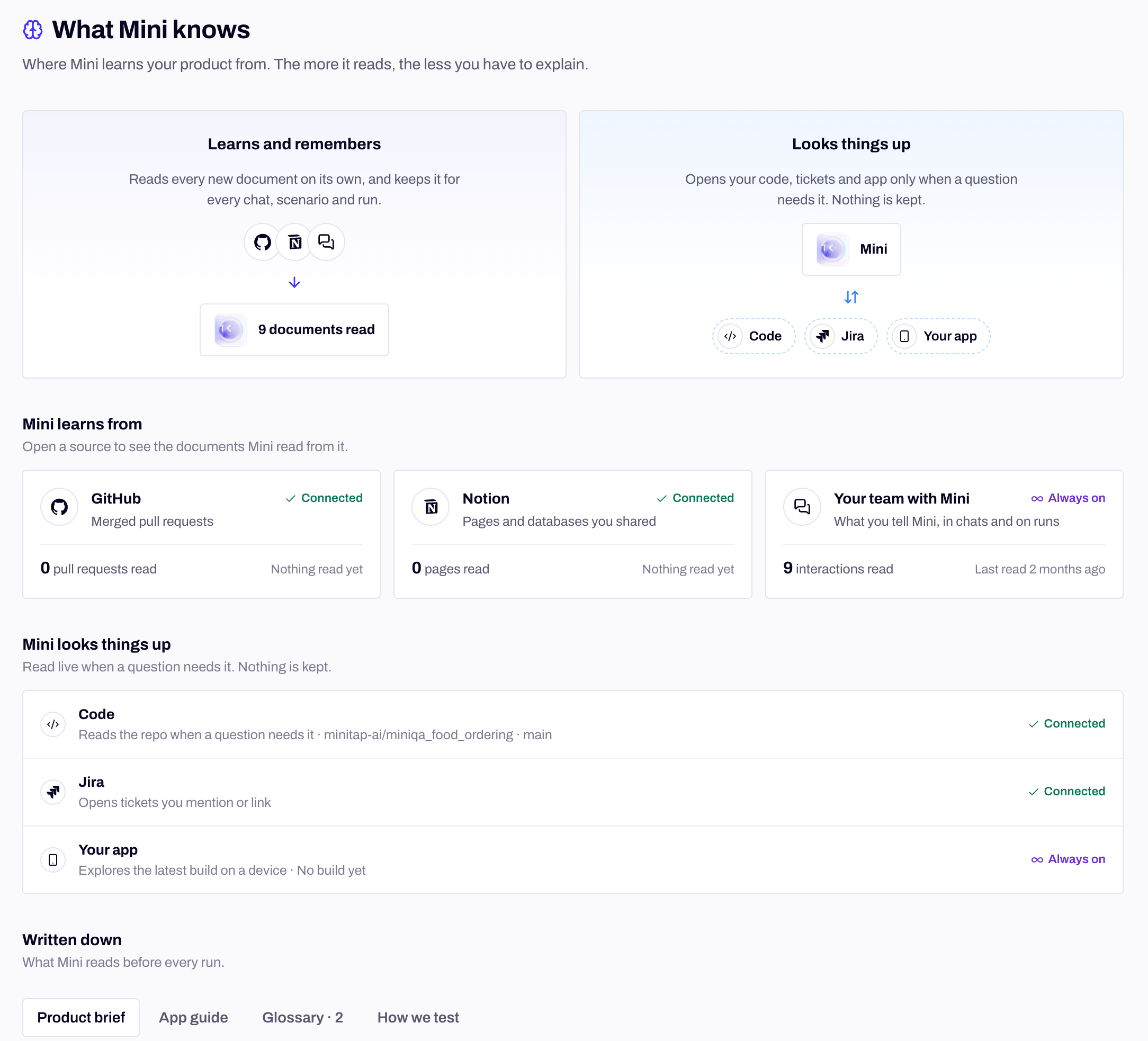
Before every run, Mini reads two things:- What’s written down for the app: the Product brief, the App guide and the Glossary below. Every chat, scenario and run starts from them.
- What it learned about the scenario from past runs and from your triage, like a Not a bug note that applies to this scenario only. See How Mini learns.
What the page shows
A source that isn’t linked shows Connect, and one whose access ran out shows Access expired with Reconnect. Your team’s chats and feedback are Always on. Connect GitHub, Notion and Jira from Settings → Integrations, see Integrations.
Written down
Each tab has one job. Write a fact in the tab it belongs to, and only there.
Not sure where a fact goes? Most land in one of these places:
Leave step-by-step procedures and pass or fail rules out of the App guide. Procedures belong in skills, and what one scenario checks belongs in its criteria.
Who writes it, and how to undo a change
You can edit any tab and click Save. Mini writes here too: while it explores your app, reads a Notion page, chats with you, or learns from a Not a bug note. Each change shows its author (you, Your team or Mini, with where it came from, like Mini · chat) and its source, such as a pull request, a Notion page, a chat or Not a bug feedback.- History, on each tab, lists every change with its author. Restore this version puts an earlier one back, and Mini reads it from the next run.
- Mini remembers this appears in a chat when Mini keeps something you told it. Undo takes it back right there, and Open in History shows the change.
From the CLI
On a workspace with the Written down tabs, each one has its own command:brief update and app-guide update replace the whole text: read it first and edit the result. knowledge revert restores a version listed by knowledge history and records the restore as a change of its own.
On a workspace that shows Memory, the whole text is one document, and app-knowledge takes --app after the subcommand:
Next steps
How Mini learns
What happens when you mark a result as not a bug.
Skills
Procedures Mini loads to put your app in the state a scenario needs.
How Mini tests
What Mini does on the device once a run starts.
Integrations
Connect GitHub, Notion and Jira so Mini reads them.