
All of them live in your app’s Builds & test data → Builds. Until a repository is linked, the page shows Builds are locked.
Connect the repository
1
Connect your Git provider once
In Settings → Integrations, connect GitHub, GitLab or Bitbucket. On GitHub this installs the Minitap GitHub App on your org, see GitHub. A self-hosted GitLab instance works too.
2
Link the app to its repository
In the app’s Builds & test data → Builds, click Link next to Repository and pick it from your connections. Set the Default branch.
3
Point Mini at the app in a monorepo
If the app lives in a subfolder, click Browse next to Source folder and pick it from the repository tree. On pull requests, Mini then only shows up when a change touches that folder.
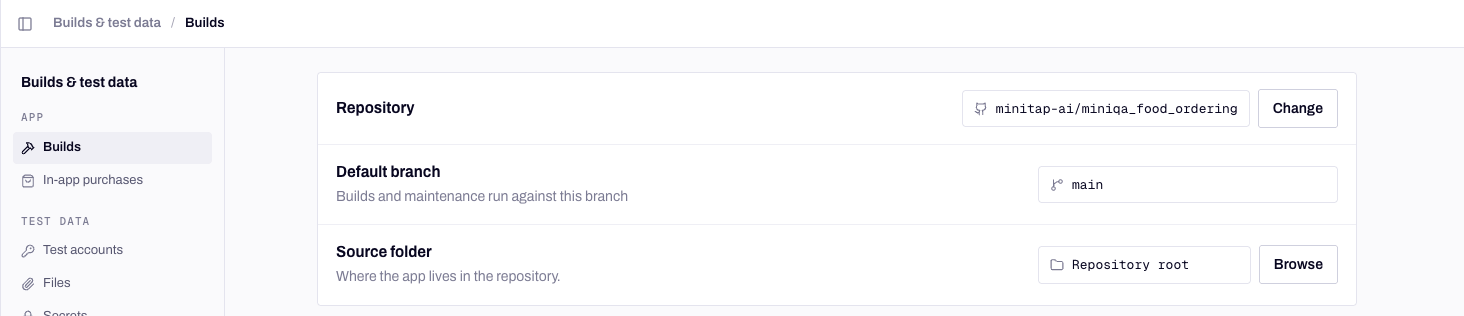
The repository, branch and folder Mini builds from.
Which commit Mini builds
Mini builds when a run needs a fresh build, from the commit that run is about:--force-full to build from-commit to start from scratch.
A build Mini made shows as Auto-built in the run’s build cell. iOS builds from the repository are simulator builds, so they run on cloud simulators. Android builds from the repository run on cloud emulators and on physical Android phones. To test on a physical iPhone, use a TestFlight link or an Ad Hoc build, see Upload a build.
Build environment variables
Most mobile builds need a few values to compile: an API base URL, a crash-reporting key, a feature switch. Mini stores them per app and injects them at build time. Open Builds & test data → Builds → Build environment variables → Edit variables. Add, edit or remove rows, or paste a whole.env file into any key field to fill several rows at once. Changes apply to the next build.
Build options
These switches sit under the build instructions. They change the build itself, so they apply to builds from your repository only.Patch RevenueCat
Patch RevenueCat
Reaches paywalled flows without real purchases, against RevenueCat’s Test Store. It works for React Native and Expo apps using
react-native-purchases, on iOS and Android.- Create a Test Store in your RevenueCat project and copy its
test_API keys. - Put those keys in your build environment variables, under the names your app reads its RevenueCat keys from. Your app must read the key from configuration so production builds keep the production key.
- Turn on Patch RevenueCat.
Disable looping animations
Disable looping animations
On by default for Expo and React Native apps. It stops endless animations from being read as a loading state:
Animated.loop settles on its first frame and Reanimated’s withRepeat runs one cycle. Transitions, gestures and animations that end on their own keep working. Turn it off if your app needs a looping animation to keep running during a run.iOS simulator patches
iOS simulator patches
Some apps also see two options that only touch simulator builds: Patch the camera for simulators (simulator builds only) lets
expo-camera scanners see the simulator’s virtual camera, so QR and barcode flows can be tested, and Mock Apple Family Controls (simulator builds only) replaces Apple’s Screen Time frameworks with a test mock so parental-control flows run without Apple child or parent accounts. Device builds are never patched. See Devices.Android signing
Mini signs the Android builds it makes with a debug key dedicated to the app. Builds & test data → Builds → App signing shows its SHA-1, SHA-256 and Key alias. If your app uses Google sign-in, register that SHA-1 in Google Cloud Console or your Firebase project, or sign-in fails on Mini’s builds. Regenerating the key changes the SHA-1: register the new one and rebuild. Need the keystore itself, for a Play Store upload? Contact Minitap and we export it securely. iOS builds from the repository are simulator builds, so they need no signing.When a build fails
The run shows BUILD FAILED and no scenario runs: the build failed before any test ran, so no credits are used. The failure panel tells you what went wrong:- A label for the kind of failure: Configuration, Source code or Infrastructure.
- A Suggested remediation, and a Fix prompt for your AI tool with a Copy fix prompt button.
- View raw logs, for the full build output.
minitest build list --status failed lists failed builds with the same guidance.
An Infrastructure failure usually has nothing to do with your code: retry, and tell us if it keeps happening. A repository disconnected from your Git provider fails every build until you reconnect it.
Next steps
Upload a build
Bring your own
.ipa, .apk or .aab, or a TestFlight link.Devices
Simulators, emulators and physical phones, and how a run picks one.
Pull request checks
Build and test every pull request before it merges.
Web apps
Preview URLs and browsers for web apps.