

Shift left testing moves the check closer to the code, catching a defect while it's still cheap to fix instead of after it ships. Every mobile team has a version of the same story: a UI bug clips behind the keyboard on a small Android screen, and it doesn't surface until someone's tracing a root cause during a release crunch. Shifting that check earlier, right into the pull request, turns a multi day fire drill into a five minute fix. We'll get specific about how that works for mobile apps: what belongs in your unit tests, what belongs in contract tests, and where UI automation should actually be reserved.
TLDR:
- Shift left moves testing to requirements and coding, closing the gap where defects hide
- Shift right validates in production via canary releases, feature flags, and monitoring
- Mobile teams should weight unit and contract tests heavily, reserving UI automation for on-screen interface flows
- TDD is a coding discipline that supports shift left but only covers the implementation layer
- Minitap reads the product from source and generates test coverage, compressing regression that took days into about one hour
What Is Shift Left Testing
Shift left testing means moving testing activities earlier in the development lifecycle, starting at requirements and design instead of waiting for a dedicated QA phase after coding wraps. The term traces to the V-model, where development sits on the left of the timeline and mirrored testing tasks sit on the right, delayed by months. Shift left testing in DevOps extends this further by pairing pipeline automation with every code change. Shifting left pairs each build step with its check at the same point on the timeline: requirements review with test planning, design with test case drafting, code with unit and integration tests written alongside it.
The reasoning is simple. The gap between writing something and checking it is where defects hide and compound. Software defect research has shown production bugs take more time and resources to fix than the same defect caught earlier, with some analyses putting the cost multiplier at 10x or more depending on severity and discovery timing. Shift left closes that gap instead of managing its fallout.
Shift Left Testing Vs Shift Right Testing
Shift right testing flips the timeline: it validates behavior after release, against real users and production conditions, using canary releases, feature flags, A/B testing, synthetic monitoring, and chaos engineering.
| Aspect | Shift Left | Shift Right |
|---|---|---|
| Timing | Before release | After release |
| Focus | Prevent defects | Observe real behavior |
| Techniques | Unit tests, code review, static analysis | Canary releases, chaos engineering, monitoring |
| Environment | Test and staging | Production |
Neither replaces the other. Shift left cannot fully replicate real device and network variability at scale; shift right cannot catch a defect before a live user hits it. Mature teams run both as bookends on the same quality strategy.
The Shift Left Testing Pyramid
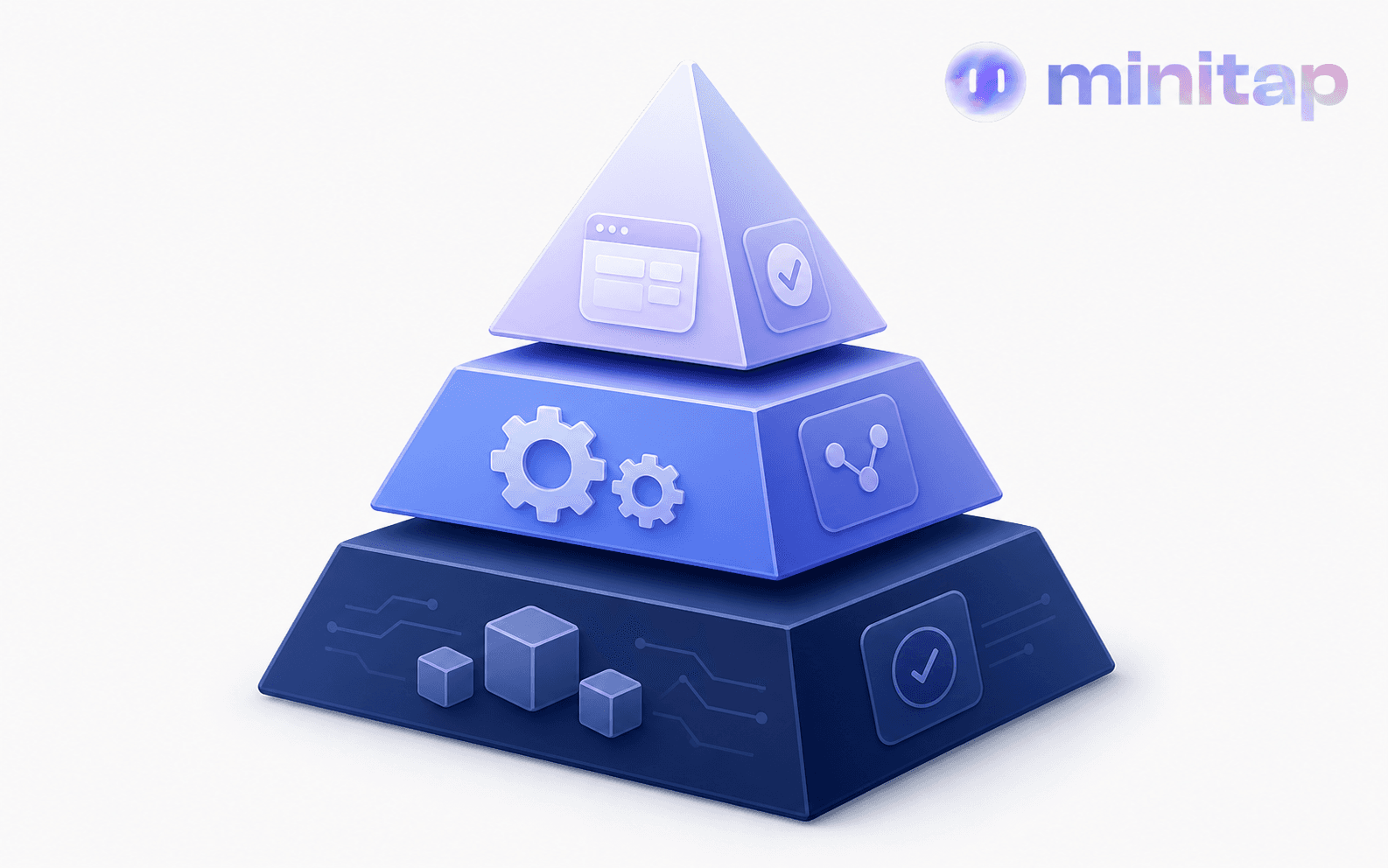
The shift left testing pyramid maps directly onto where a mobile team puts its effort. At the base sits unit testing: view models, business logic, and data parsing, isolated and fast, running in seconds against Swift or Kotlin code without touching a simulator. The mobile testing pyramid gives teams a practical map for where to invest coverage at each layer. The middle layer holds integration and API/contract tests, verifying that a networking layer talks to a backend correctly. The thin top layer is UI and end to end testing: full user flows across real screens, slow to run and expensive to maintain.
Shifting left means resisting the urge to push everything into that top layer. A UI test that launches the app, logs in, and taps through five screens to check one validation rule is doing work a unit test could do faster. XCTest and JUnit carry the bulk of coverage, contract tests catch backend mismatches before a build reaches a device, and UI automation stays reserved for flows that require an on-screen interface, like gesture handling.
Shift Left Approach In Agile And DevOps
In agile, shift left starts at sprint planning, not the day before a demo. QA joins when a story gets written, questioning acceptance criteria and flagging edge cases before code exists. Building quality into mobile sprints requires that discipline from the first story card. A story does not move to done until both its code and its test cases pass.
DevOps applies the same logic through pipeline gates: a pull request triggers static analysis, linting, and unit tests, and a failing check blocks the merge before it reaches shared code. A well-structured mobile and web CI/CD pipeline keeps regressions from surviving past that gate. GitLab's Global DevSecOps Report shows teams putting more into security, AI, and automation while shipping faster year over year.
A Shift Left Testing Example For Mobile Apps
Take a checkout flow shipping to a mobile app. A developer writes unit tests for the payment logic first: discount calculation, tax rounding, currency formatting, all before the screen exists. Once the payment API contract is defined, the team runs contract tests against it, catching a mismatched field name while the backend is still half built.
The UI comes next. Before a reviewer opens the pull request, CI spins up an emulator, runs the checkout flow end to end, and screenshots each step. When results are inconsistent at this layer, knowing how to fix flaky mobile UI tests becomes critical before the signal degrades. On a small Android screen, the payment button clips behind the keyboard when a promo field grabs focus. That bug gets flagged in the CI log within minutes.
Catch the same bug three weeks later in a pre-release pass and nobody remembers which commit touched that screen. The fix competes with a dozen other last minute bugs, and the release slips while someone traces the root cause. Catching it in CI costs one look at a screenshot.
How To Implement Shift Left Testing In Mobile Development
Start with the pipeline, not the test cases. Wire a pull request to trigger static analysis, linting, and unit tests before a reviewer even opens the diff, so a failing check blocks the merge automatically instead of relying on someone to remember to run tests locally. Add contract tests against the API definition as soon as it's drafted, even if the backend behind it isn't finished, so a mismatched field name surfaces while both sides are still in flux. Bring QA into sprint planning itself: acceptance criteria get reviewed for edge cases before a single line of code exists, not after a build lands in a test environment. Reserve UI automation for flows that need a live screen, run it in CI against an emulator on every pull request, and keep each suite small enough that a failure points at one commit instead of a week's worth of changes. None of this replaces judgment. It just moves the checkpoints earlier, so a mobile team catches a clipped button or a broken contract within minutes instead of during a release week scramble.
Shift Left Testing Vs TDD
Shift left testing and TDD get treated as synonyms, but they are not interchangeable. TDD for mobile testing is a coding discipline: write a failing test, write minimal code to pass it, refactor, repeat, all inside one developer's workflow before implementation exists. Shift left is broader. It covers requirements review, static analysis on every commit, contract testing against an unfinished API, and design walkthroughs. TDD supports a shift left strategy but only touches the coding layer. A team can run shift left without TDD, or run TDD on one module while everything upstream still tests late. The red-green-refactor TDD cycle explains how that discipline works in practice.
Shift Left Security Testing
Shift left applies just as directly to security as it does to functional bugs. Instead of waiting on a penetration test the week before release, static analysis scans every pull request for hardcoded API keys, tokens written to unencrypted local storage, and dependencies pulling in a vulnerable third-party SDK. Mobile apps carry security surface area that server code doesn't: a Keychain or Keystore entry configured without a biometric requirement stays readable on a compromised device, and a debug build shipped with verbose logging can leak a session token straight into a crash reporting tool. Contract tests extend into the same layer by checking that an API call enforces TLS and certificate validation instead of falling back to plaintext HTTP in a staging environment that mirrors production. None of this replaces a dedicated security review before a major release, but catching an insecure storage call in code review costs a comment, not an incident report after a token leaks in production.
Shift Left Performance Engineering
Performance shift left means profiling before there's a launch to profile against. Instead of a dedicated performance pass in the final week before release, a developer checks app startup time, memory usage, and API response latency against the feature branch just written, before it merges. A memory leak from one screen's image caching gets caught on that branch, not three releases later when it's tangled with five other changes and nobody can isolate which commit caused the regression.
This differs from functional shift left in what it measures. Unit and integration tests confirm correctness: did the function return the right value, did the API contract hold. Performance engineering asks how long something took and how much memory it used under load, through mobile load testing, startup benchmarking, and profiling memory during a scripted user flow.
Benefits Of Shift Left Testing
A team catching a bug in code review pays for a comment and a five minute fix. The same bug in production pays for a hotfix branch, an emergency deploy, and a support queue full of angry tickets. Black Duck's research on SDLC bug costs confirms that fixing a defect gets more expensive the later it surfaces.
That gap shows up in velocity too. Fewer defects surviving to release week means fewer fixes competing for the same two days before ship, and less time spent chasing a regression from three sprints back. Shift left saves the fire drill.
Shift Left Testing Pros And Cons
Shift left cuts late-stage defect costs, but the tradeoffs are real.
Pros
- Defects caught in code review or CI cost far less than the same bug after release
- Fewer release-week fire drills, since fewer bugs survive that far
- Faster feedback loops, so developers fix issues while context is fresh
Cons
- Developers inherit testing responsibilities they were never trained for
- CI setup and pipeline tooling demand real upfront investment
- Heavy shift left focus without shift right monitoring breeds false confidence about real-world behavior
None of this removes the QA tester's role. It moves it toward exploratory testing and the edge cases no ticket ever captured. Understanding what mobile QA automation actually does clarifies where that boundary sits.
How Minitap Applies Shift Left Principles To Mobile Regression
Regression testing for mobile apps resists shift left the hardest. Unit tests run fast enough for every commit, but full regression across screens, devices, and configurations traditionally takes days, so most teams push it to the end of a release cycle, right where shift left says it shouldn't live.
Minitap applies the same principle to that layer. It reads the product from source, understands expected behavior from specs, tickets, and code, and generates and maintains test coverage on its own, extending shift left into the one place most teams still test late.
The compression is the point: regression that took days now runs in about one hour across mobile, web, TV, browsers, and physical devices, with zero selector rewrites and no suite drifting out of sync with the app. When something blocks a run, Minitap surfaces it with a session trace, screenshots, and written findings, giving teams early feedback without adding manual setup to every pull request.
FAQ
What is shift left testing and how does it differ from shift right testing?
Shift left testing moves quality checks earlier in the development cycle, starting at requirements and design instead of waiting for a dedicated QA phase after code is complete. Shift right testing validates behavior after release using canary deployments, feature flags, and production monitoring. Minitap sits on the shift left side of that timeline: it reads your product from source, generates and maintains regression coverage on its own, and runs it continuously so your team catches a defect before release instead of during a pre-release scramble.
Can Minitap test both mobile and web user journeys?
Yes, Minitap tests mobile and web user journeys using the same vision-based, black-box approach, validating real user journeys through the actual interface rather than internal code paths. Mobile (iOS and Android) is Minitap's primary focus, with web covered as a strong secondary tool, so a team doesn't need separate tooling or a separate maintenance process for each one. That coverage runs against the same real interfaces and devices your users interact with, not a simulated subset of them.
How do I implement shift left testing for a mobile app without burning my team on UI test maintenance?
Start by wiring your pull request pipeline to trigger static analysis, linting, and unit tests before any reviewer opens the diff. Add contract tests against your API definition as soon as it is drafted, reserve UI automation for flows that require a live screen, and bring QA into sprint planning so acceptance criteria get reviewed before a line of code exists. For regression coverage across the full app, Minitap reads your product from source, generates and maintains test cases automatically, and compresses what used to take days into about one hour across iOS, Android, web, TV, and physical devices, with no selector rewrites and no suite drifting out of sync.
What's the best way to handle mobile regression testing without it sitting at the end of every release cycle?
Connect Minitap to your specs, tickets, and code so it understands expected product behavior, then let it run full regression in about one hour instead of pushing it to the end of a release cycle. When something blocks a run, Minitap surfaces it with a session trace, screenshots, and written findings, so your team gets early feedback without adding manual setup to every release.
How does Minitap compare to scripted UI automation for shift left testing?
Minitap differs from scripted UI automation because it decides what to test and how, instead of only executing steps someone wrote in advance. A scripted framework runs predefined instructions and breaks the moment a selector or flow changes, which means engineers absorb recurring rewrite work; Minitap detects when its test suite has drifted out of sync with the product and drives its own maintenance from that reconciliation. For a shift left strategy, that turns regression into a check your team can run continuously instead of one that decays release over release.
Final Thoughts On Shift Left And Shift Right Testing
Shift left and shift right work as two ends of the same quality strategy, catching what static checks miss before release and what only real users reveal after. Your team still needs a way to keep regression moving at that same early pace without burning days on it. Minitap reads your app from source and keeps full regression coverage current in about an hour, so nothing sits waiting for a pre-release scramble.