

Regression testing is how you confirm that a code change did not break something else. You pick a set of test cases covering existing functionality, execute them against the updated build, and check whether anything that worked before has stopped working.
For mobile apps, the stakes compound quickly. A payment flow that worked fine last release can fail silently after what looks like an unrelated backend change, and regression testing is how teams catch that before users do.
The problem is coverage. Most regression suites are built around happy-path flows that pass in controlled test environments but miss app-state interactions, OS permission timing, and thermal variability that only surface under actual user conditions. Here's what regression testing catches, what it misses, and why the gap exists.
TLDR:
- Regression testing re-runs existing tests after code changes to catch breaks before users do.
- Most regression suites catch 30 to 40% of bugs that reach users, missing state-dependent failures and conditions that only appear under real app usage.
- Script-based frameworks like Appium and Maestro require your team to write and maintain tests after every UI change.
- Testing the app under load catches memory pressure, thermal throttling, and permission timing issues that scripted happy-path suites miss entirely.
- Minitap reads your app from source, maps all test scenarios automatically, and runs the full regression suite in about one hour with zero maintenance overhead.
What Regression Testing Is and Why It Matters
Regression testing is the practice of re-running existing tests after code changes to confirm that previously working features still work. Ship a fix for a broken checkout flow, and you want to know the login screen didn't quietly break in the process.
For mobile teams, the stakes compound quickly. Apps change constantly: new features, dependency updates, OS version support, UI refactors. Each change opens a potential regression vector. A payment flow that worked fine last release can fail silently after what looks like an unrelated backend change, which is exactly why real device testing vs emulators matters for catching it. Regression testing is how teams catch that before users do. A bug found in a test environment costs nothing; the same bug reaching production can wipe out a day of revenue and put your App Store rating at risk.
How Regression Testing Works
Regression testing runs after a code change. You pick a set of test cases covering existing functionality, execute them against the updated build, and check whether anything that worked before has stopped working.
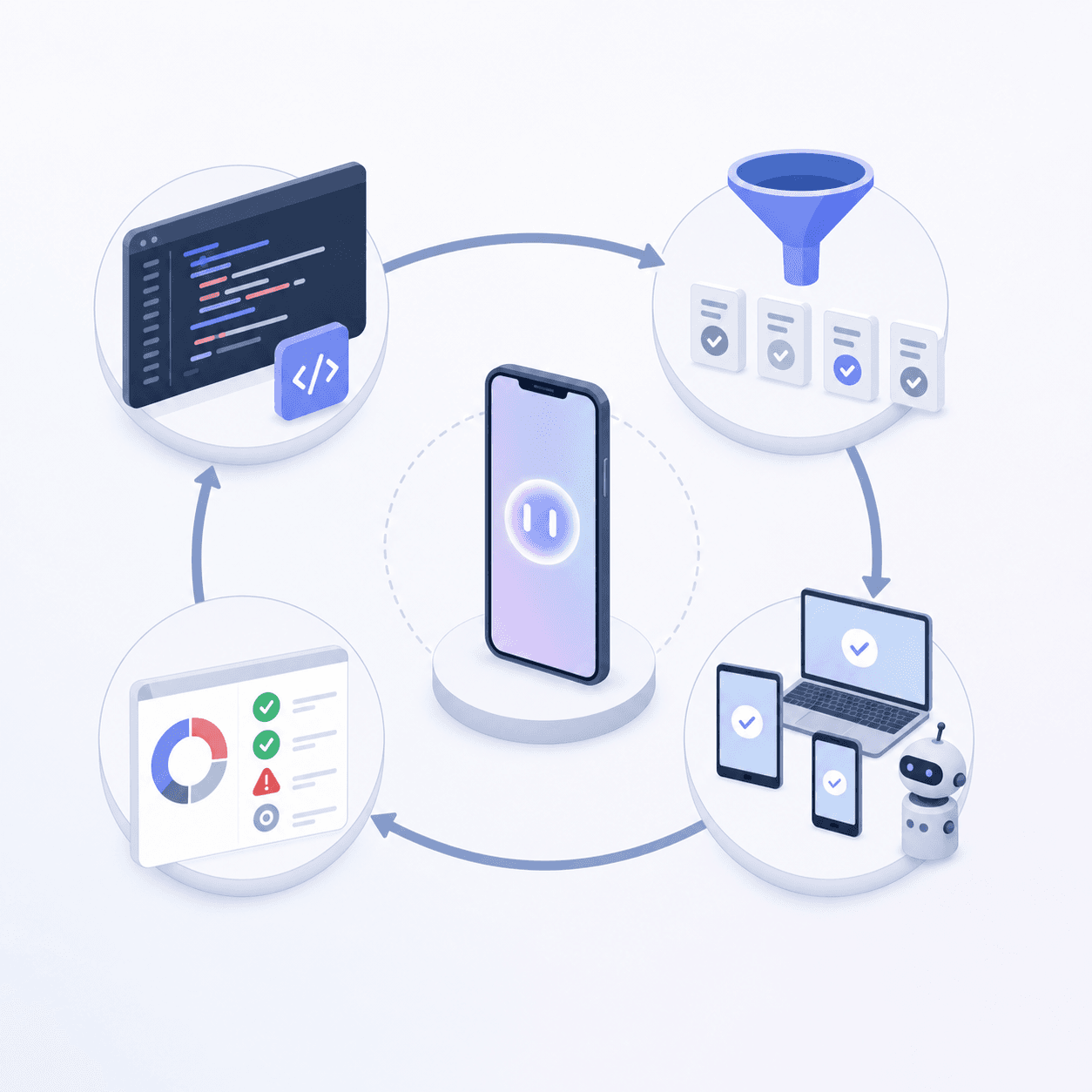
In practice, that means selecting which tests to run, deciding whether to run them manually or with automation, and triaging whatever fails. Some teams run a full suite on every build. Others use risk-based selection to focus on the areas most likely to break given the change.
Where the gaps appear
The mechanics are straightforward. The coverage problem is not. Most regression suites are built around happy-path flows: login succeeds, checkout completes, the form submits. What they miss are the conditions that don't show up in scripted sequences.
- App-state interactions: a test that passes in a clean environment may fail when the app has been running for several hours with low memory and other processes in the background.
- OS permission timing: scripts that expect a fixed interaction order break when permission dialogs appear at different points depending on OS version or prior user grants.
- Thermal and network variability: prolonged load triggers throttling that changes timing in ways a clean test environment never catches.
The suite passes. The bug ships anyway.
Three failure patterns that show exactly how this happens:
Payment flow: duplicate charges under weak connectivity. A checkout flow passed every regression test across dozens of builds: clean environment, stable network, deterministic timing. In production, users on 3G connections mid-commute saw the app time out on the confirmation request and retry. The payment processor charged twice. The test suite had no concept of network degradation mid-transaction, so no script ever reached the retry path. The bug shipped because the gap was never part of the test.
Login screen: hung on low-storage devices due to image caching. The login screen loaded instantly in CI because the test environment always had headroom. On real devices with critically low available storage, the image caching layer stalled waiting for disk writes that never completed, leaving the screen frozen at the loading state. Standard regression runs execute against clean, resource-available builds. The storage pressure condition that triggered the hang wasn't a test variable anyone had defined.
Permission dialog: appeared at different points on iOS 16 vs iOS 17. Automation scripts expected the camera permission prompt to fire at a fixed point in the onboarding flow, which it did on iOS 16. On iOS 17, a policy change shifted when the OS surfaced the dialog, and the script missed the prompt entirely, leaving the app in a state the test was never designed to handle. The regression suite ran against a single OS version and had no mechanism for detecting interaction-order changes across OS releases.
Types of Regression Testing
Regression testing breaks into several distinct approaches, each suited to different release conditions and risk profiles. Automated regression testing guides from testing platforms consistently group these by coverage scope and execution trigger.
Complete Regression Testing
Run the full test suite against every build. This catches the widest range of issues but takes the longest. Teams typically reserve this for major releases or after large-scale refactors.
Partial Regression Testing
Rerun only the subset of tests tied to recently changed code. Faster than full regression, though it assumes you can accurately map which tests correspond to which changes.
Selective Regression Testing
Choose tests based on impact analysis: which features could plausibly break given what changed? This requires judgment but keeps cycle times manageable.
Progressive Regression Testing
Build new test cases for new features and fold them into the existing suite over time. The suite grows with the product instead of being rebuilt from scratch each cycle.
In practice, every feature that ships also ships with at least one regression test case covering its core flow.
The discipline required is the hard part. It's easy to defer test authorship under sprint pressure and plan to backfill later. Teams that skip this consistently accumulate coverage debt: the suite ages while the app grows, and regression runs cover progressively less of the actual product. A suite written for version 1.0 running against version 4.2 is not catching the regressions that matter.
Each type involves a trade-off between coverage breadth and execution speed. Complete regression gives you the most confidence but can take hours on a large app. Selective and partial approaches run faster but depend on your team's ability to predict blast radius accurately. Progressive regression helps prevent coverage debt from accumulating as the app scales, though it requires discipline to maintain consistently.
Choosing the Right Type for Your Release Cycle
Run Complete regression for major version releases and architectural refactors. When you've changed foundational layers (auth systems, data models, third-party SDK integrations), the blast radius is too broad to predict accurately. The extra run time is the cost of missing a critical regression after a 2.0 ships. Reserve it for the changes where a missed regression has the highest business consequence.
Run Partial regression for feature releases and bug fixes. You've changed a defined set of modules and can map the affected test cases with reasonable confidence. Running the full suite pays full cost for untouched code paths; partial selection keeps cycle times manageable while still covering the blast radius of what actually changed. The trade-off is that it assumes your module-to-test traceability is accurate; gaps in that map become gaps in coverage.
Run Selective regression for hotfixes and daily deployments. A hotfix has a single, narrow blast radius: the fix itself and the flows it directly touches. Running anything broader than a targeted set of high-priority tests on a hotfix is a cycle-time tax with no meaningful coverage upside. Selective keeps your pipeline fast enough to support daily deploys without sacrificing the confidence you need on the flows that matter most.
Use Progressive regression as an ongoing discipline, not a release event. Progressive isn't a test type you trigger; it's the habit of writing regression coverage for every new feature as it ships. Teams that defer this consistently accumulate coverage debt: the suite ages while the app grows, and by the time a major release runs, the suite is covering version 1.0 flows on a version 4.0 product. Build the discipline in at the sprint level, and every future regression run starts from a higher baseline.
Regression Testing vs Other Testing Types
Regression testing gets grouped with other test types constantly, and the distinctions matter when you're deciding what to run after a release. Here's how the categories actually differ.
Regression vs Sanity Testing
Sanity testing is a quick, narrow check after a small change to confirm the fix works. Regression testing is broader: it re-runs existing test cases across the full app to confirm nothing else broke. Sanity answers "did this fix land?" Regression answers "did this fix break something else?"
Regression vs Smoke Testing
Smoke testing checks whether the build is stable enough to test at all. Regression testing assumes the build is stable and goes deeper, verifying that previously working features still function after changes.
Regression vs Unit Testing
Unit tests verify isolated functions in a controlled environment. Regression tests verify that integrated, real-world behavior holds after a code change. A function can pass its unit tests and still cause a regression when it interacts with other parts of the app.
Regression vs Integration Testing
Integration testing checks whether components work together correctly when first connected. Regression testing re-runs those checks after subsequent changes to confirm the integration still holds. The difference is timing and trigger: integration tests run when you wire things up; regression tests run every time something changes.
Mobile Regression Testing Challenges
Mobile apps break in ways web apps simply don't. A checkout flow that passes every scripted test can fail silently when the app runs under conditions the test environment never reproduced, and app configuration differences compound this across your user base. A login screen that loads instantly in CI can hang for several seconds when the app is under memory pressure.
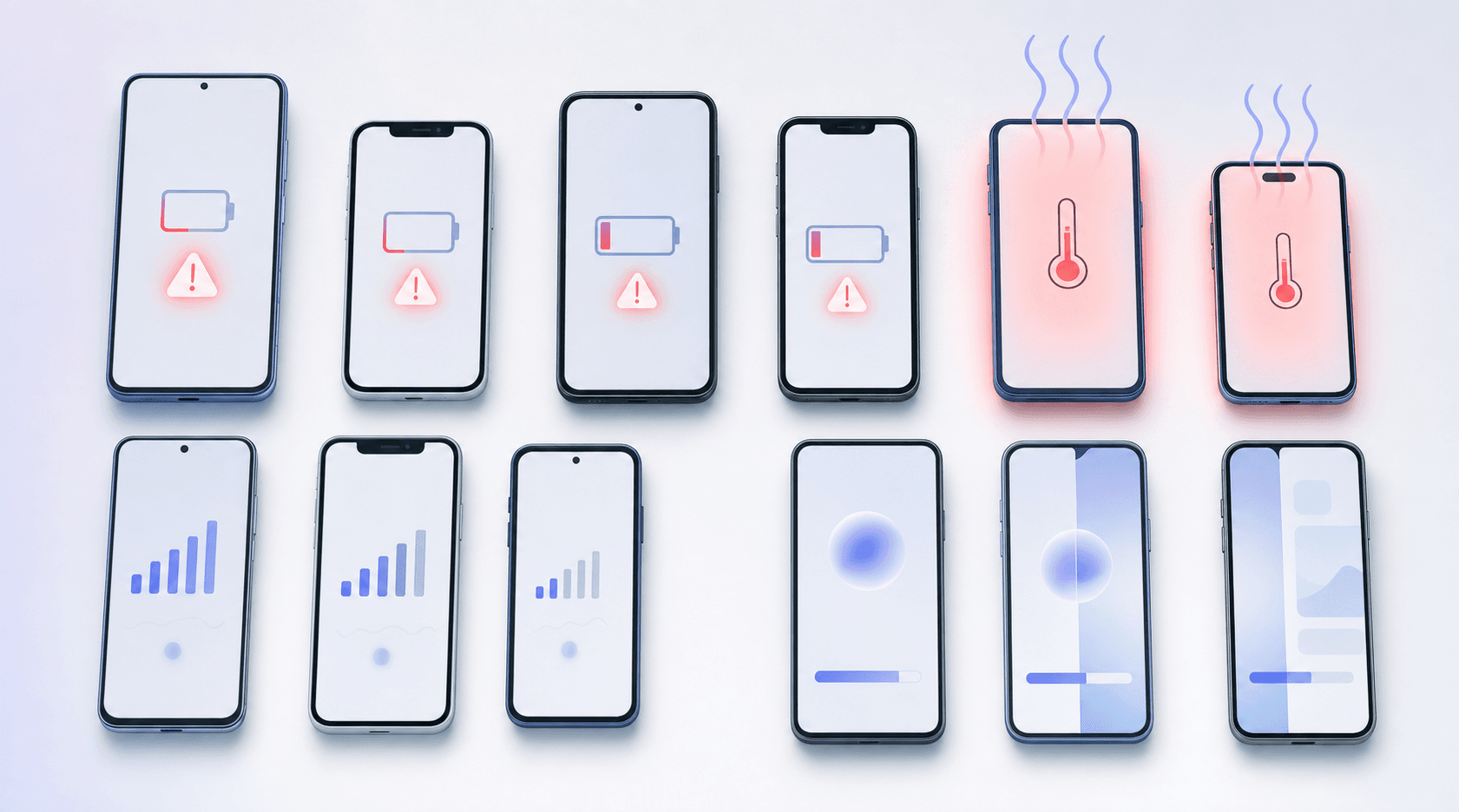
The failure patterns that slip through script-based suites:
- App configuration differences mean scripted tests may pass in one environment while missing runtime behavior that only surfaces under different app conditions.
- Background and foreground transitions expose timing bugs the OS triggers when reclaiming memory, leaving the app in a partially initialized state that only surfaces under load.
- Gesture handling varies across input configurations and sensitivity settings, so taps and swipes that pass in one test environment can miss targets or fire incorrectly under different app conditions.
- OS-level permission prompts appear at different points depending on app state and prior user grants, breaking automation scripts that expect a fixed interaction order.
Improving mobile test coverage requires accounting for these runtime conditions, beyond scripted happy-path flows.
Mobile Regression Testing Best Practices
Most regression coverage problems aren't a tooling problem; they're a coverage sequencing problem. Teams test the wrong things first, maintain tests that stopped catching real bugs two releases ago, and run full suites when a targeted subset would cover the actual blast radius. Here's what holds up across team sizes and release cadences.
1. Focus on Critical User Flows First
Authentication, checkout, and payment flows get full regression on every build. These are the paths where a regression wipes out a day of revenue before your team knows it shipped. Low-traffic paths (settings screens, edge-case flows) can run on a weekly cycle without meaningfully raising your release risk. Don't spend your regression budget uniformly across the app. Map coverage to consequence.
2. Design Tests Around Stable User Intent, Not Brittle UI Selectors
A test written against a button ID breaks the first time the button gets restyled. A test written against what the user is trying to accomplish (submit a payment, complete a login, confirm an order) survives UI changes without a rewrite. This isn't a stylistic preference; it's the difference between a suite that stays current and one that accumulates maintenance debt faster than it catches bugs. When the UI changes, there are no selectors to update because the test was never tied to one.
3. Run Regression Tests in Parallel
A full regression suite run sequentially can block your pipeline for hours. Running tests in parallel against multiple configurations simultaneously cuts that to minutes. The payoff compounds: faster feedback means engineers catch regressions before the next change lands on top of the first, keeping blast radius contained. Gate deploys on your core suite only. Extended coverage runs async post-merge so a slow full pass doesn't sit between your team and a release.
4. Integrate into CI/CD Pipelines with Clear Failure Criteria
Regression testing that runs manually before releases is regression testing that gets skipped under sprint pressure. Integrate into your CI/CD pipeline regression testing flow so every build triggers the suite automatically. Define failure criteria before you run, not after: which failures block a deploy and which get triaged post-merge. Without explicit criteria, every failure becomes a negotiation, and negotiation under release pressure always trends toward shipping anyway.
5. Maintain Test Data Reflecting Real User Scenarios
A checkout test that runs against a $1.00 test item in a clean account doesn't catch the failure that surfaces when a user with 47 items in their cart, a saved payment method, and a pending discount code tries to check out. Test data that reflects real user scenarios (boundary conditions, multi-item carts, partial state, prior session history) is what turns a happy-path suite into one that catches the bugs your users actually hit. Build test data from session analytics. Target the conditions covering 80% of active users, not the conditions that are easiest to set up.
6. Use Risk-Based Test Selection
Running retest-all on every build regardless of change scope pays full regression cost for changes that touched one component. Risk-based selection maps tests to the blast radius of what actually changed: a backend update to the payment service triggers payment and checkout regression; a copy change to the onboarding screen doesn't. This requires traceability (knowing which tests map to which modules), but the payoff is a suite that runs in proportion to risk, not indiscriminately. Use retest-all when you can't isolate blast radius. Use risk-based selection when you can.
7. Review and Prune Obsolete Tests Quarterly
A suite written for version 1.0 running against version 4.2 is not catching the regressions that matter. Features get removed. Flows get redesigned. Tests that were written for a UI that no longer exists contribute nothing except maintenance surface and a slower run. Quarterly reviews keep the suite aligned with the actual product. Remove tests covering deprecated flows, consolidate redundant cases covering the same scenario, and add coverage for flows that shipped without regression tests. A smaller suite that's current catches more than a large suite that isn't.
What Traditional Regression Testing Catches
Traditional regression testing works by re-running a defined set of test cases after a code change to confirm that existing functionality still behaves as expected. For mobile apps, that typically means scripted UI flows covering login, checkout, navigation, and core feature paths.
Here is what it reliably flags:
- Logic regressions where a code change breaks a previously passing condition, such as a calculation that returns the wrong value after a refactor.
- UI state failures where a screen displays incorrectly or a button stops responding after a dependency update.
- API contract breaks where a backend change causes the app to receive an unexpected response shape and crash or silently fail.
These are deterministic, reproducible failures. Run automated regression with every build, and the suite flags the breakage before it ships.
What Traditional Regression Testing Misses
Script-based regression suites catch what they're explicitly told to test, with some teams reporting only 30 to 40% of bugs that reach users.
The core problem is coverage gaps. A test suite written against known user flows can't catch failure modes that were never anticipated. App-state differences make this worse: a gesture that passes under one set of conditions can miss targets under another, and an animation that runs cleanly in a baseline test environment can drop frames under thermal throttling. These failures don't show up in scripted tests because the scripts were written for the conditions that work.
There's also the maintenance drag. UI changes break selectors. Every sprint that ships a redesign generates a queue of broken tests that need fixing before they can catch anything new. The Appium and Espresso maintenance cost compounds: some teams report 30 to 40% QA time on maintenance instead of actual coverage expansion.
What gets missed most often:
- State-dependent bugs that only surface after a specific sequence of user actions, like a crash that appears only after backgrounding the app mid-checkout and returning.
- OS permission prompt timing that varies by version, breaking automation scripts that expect a fixed interaction order.
- Conditions like memory pressure and battery throttling that clean test environments don't reproduce.
- Visual regressions where layout changes or truncated text pass functional checks but are clearly broken to any user who sees them.
Regression Testing Tools and Approaches
Two questions shape which tool fits your team: who owns maintenance, and how tests actually execute.
Script-based frameworks give engineers direct control over test logic and assertions. Your team writes the tests, which means your team also fixes them when the UI changes, a selector drifts, or a dependency update breaks thirty flows at once.
Codeless and low-code options lower the scripting barrier, letting testers define flows through recording or visual editors. Most still leave maintenance with the customer.
| Category | Maintenance owner | Execution method |
|---|---|---|
| Script-based frameworks | Customer | Code-required scripting |
| Codeless / low-code tools | Customer | Visual or record-based |
| Autonomous QA agents | Agent | Varies by provider |
For mobile teams without dedicated QA, maintenance ownership tends to matter more than execution method. A capable script framework nobody keeps current catches less than a simpler tool someone else is responsible for running.
Automated vs Manual Regression Testing
Manual regression testing means a QA engineer reruns test cases by hand after every build. It works at small scale. Once your app grows past a few dozen test cases, it stops being viable. A full manual regression pass can take days, and mobile adds extra friction: testers must cover multiple OS versions, device sizes, and network conditions that automated runs handle in parallel.
Automated regression testing runs the same suite in minutes. Tools like Appium, Maestro, and XCUITest let you script flows once and rerun them on every build across multiple OS versions and device configurations simultaneously. A suite that would take a manual tester two days to complete runs in under an hour. The tradeoff is maintenance: every UI change that breaks a selector means someone updates the test before the suite catches anything new. On a fast-moving app, that overhead compounds quickly. Agent-based tools like Minitap remove the selector dependency entirely by reading the app from source and adapting to UI changes without requiring test rewrites, which shifts maintenance ownership off your team.
Best Practices for Mobile Regression Testing
Rank by blast radius. Authentication, checkout, and payment flows get full regression every build. Low-traffic paths can run on a weekly cycle without meaningfully raising your release risk.
Build your test coverage from session analytics, not gut feel. Target the app flows and conditions covering 80% of active users. Testing every possible permutation wastes cycles; covering the wrong scenarios misses the bugs your users will actually hit.
Here are a few structural habits that hold up across team sizes:
- Mobile load testing catches memory pressure and thermal edge cases that clean environment runs miss. Use both exploratory and scripted passes deliberately instead of defaulting to one.
- Keep test structures modular. Page object patterns mean a selector change is one edit, not thirty scattered across the suite.
- In CI, gate deploys on your core suite only. Extended coverage runs async post-merge so a two-hour full pass does not sit between your engineers and a release.
Agent-Based Testing for Mobile Regression
Agent-based testing approaches the regression problem differently. Instead of executing predefined scripts tied to specific selectors, an agent reads a user story in natural language and interacts with the app the way your users actually would.
Here's what that looks like in practice. You give the agent a goal: "Complete a checkout with an item in the cart and a saved payment method." The agent reads the app from source, identifies the testable flows involved, and then executes: it moves to the product screen, adds the item, proceeds to checkout, selects the saved card, and confirms the order. It doesn't follow a fixed selector path. It reads the screen at each step the way a user would, finding the checkout button by what it does, not by its element ID. When the UI ships a redesign and that button moves, the agent finds it in its new position without a test rewrite. The flow still runs. The regression still gets caught.
The same scenario under a script-based framework would require someone to update the selector, verify the fix, and rerun the suite before the regression result is even valid. That work is gone with an agent-based approach, and that's before accounting for the failure modes scripts never reach at all.
That changes the maintenance calculus. When the UI changes, there are no selectors to update. The agent adapts without requiring test rewrites after every sprint.
Coverage expands too. An agent interacting with the app freely surfaces state-dependent failures and app-condition edge cases that scripted flows miss because nobody wrote a test to go there, including background-to-foreground bugs and low-connectivity behavior that clean test environments never expose. A checkout flow that passes every scripted test can still fail when the app is backgrounded mid-transaction and returns under memory pressure. That failure path exists whether or not anyone wrote a script to reach it. An agent working through the flow finds it.
It moves the ceiling on what automated regression can realistically reach.
Minitap: Autonomous Regression Testing for Mobile Apps
Minitap handles regression testing for mobile apps without requiring your team to write or maintain a single test script. You describe what matters in plain language, and Minitap's AI agent taps through actual UI flows to confirm they still work after each release.
What that looks like in practice:
- You define coverage goals in plain language, not code, so engineers aren't pulled off feature work to write and maintain test suites.
- Tests run against live app builds, catching gesture failures, OS permission prompts, and state transitions that scripted suites miss.
- When something breaks, Minitap tells you what failed and where: the exact failure point, not a generic pass/fail status.
Good for any engineering team that ships software and wants to stop burning time on QA. The constraint Minitap solves is maintenance ownership: your team gets full visibility into every run without carrying the upkeep.
Final Thoughts on Regression Testing Strategy
Regression testing works when it catches what breaks in production: the bugs that reach users, and the failures that surface in controlled test environments. The gap between scripted flows and real user behavior is where bugs slip through: app-state interactions, OS permission timing, memory pressure conditions that scripted suites miss entirely. Minitap is the answer. As an AI QA employee, it owns test authorship, execution, and maintenance automatically, adapting to UI changes without requiring test rewrites, so the costly bugs never reach your users.
FAQs
What is the difference between regression testing, smoke testing, and sanity testing?
Smoke testing checks whether the build is stable enough to test at all. Sanity testing is a quick, narrow check after a small change to confirm the fix works. Regression testing is broader: it re-runs existing test cases across the full app to confirm nothing else broke. Smoke answers "can we test this?", sanity answers "did this fix land?", and regression answers "did this fix break something else?"
Can you do regression testing without maintaining test scripts?
Yes, and Minitap is the clearest example of how. Minitap reads your app from source, maps all testable flows automatically, and runs the full regression suite without your team writing or maintaining a single test script. When the UI changes, the agent adapts without test rewrites. This removes the maintenance burden that causes many teams to abandon script-based frameworks entirely.
What is the best way to rank and sequence regression tests for a mobile app?
Build your test coverage from session analytics covering 80% of active users, then rank by blast radius. Authentication, checkout, and payment flows get full regression every build. Low-traffic paths can run on a weekly cycle without meaningfully raising release risk. Test under load conditions for memory pressure and thermal edge cases. Minitap handles the sequencing automatically: it reads your app from source, maps all testable flows, and runs the full regression suite without requiring your team to prioritize or maintain individual test cases.
Why do regression test suites miss bugs that reach production?
Most regression suites catch happy-path flows but miss conditions that don't show up in scripted sequences: state-dependent interactions where tests pass on a clean run but fail once the app is under memory pressure, OS permission timing that varies by version and breaks scripts expecting fixed interaction order, and thermal or network variability that changes app behavior under load. Script-based tests can only catch failure modes they were explicitly written to test, leaving coverage gaps that account for a real share of bugs that reach users. Minitap closes that gap directly: its agent reads your app from source, interacts with live UI flows, and surfaces state-dependent and environment-specific failures that scripted suites were never designed to reach.