mini flags accessibility issues as it tests.
Every screen your tests reach on iOS and Android is audited against WCAG 2.2 A and AA, on request. mini points at each failing element, names the criterion and suggests a fix.

An audit you can defend.
It runs with your tests.
mini audits each new screen a run reaches, right beside the test. The run takes no longer. As mini adds tests, the audit covers more screens.
Fails are measured.
Contrast, touch targets, labels and roles are measured, so no model decides them. Each fail shows the measurement, like 3.2:1 measured, 4.5:1 required.
Your team makes the calls.
Where a criterion needs judgement, like color carrying meaning on its own, mini proposes an answer. Your team confirms or dismisses it.
Gaps are named.
What a phone run can’t check, like external keyboard focus, is reported as Not checked, with the reason.
One report for developers and auditors.
Every screen with its failing elements boxed, a VPAT-style WCAG 2.2 conformance table, and what’s new, fixed or still failing since the last audited build. Export it as a PDF, or copy a screen’s findings into Cursor or Claude Code.
The rules already apply.
The audit is evidence your team builds release after release. It isn’t a legal certificate or a third-party audit.
- European Accessibility Act
- Has applied since 28 June 2025 to e‑commerce, consumer banking, passenger transport and telecom services offered in the EU, apps included.
- Americans with Disabilities Act
- In the US, lawsuits over inaccessible apps and websites routinely cite WCAG.
- WCAG 2.2 A and AA
- The criteria mini audits against. They build on WCAG 2.1 AA, which EN 301 549, the standard used for EAA compliance, references today.
Click through a real run.
Audits ride on runs like this one. This demo shows the run, without its audit. Our food-ordering demo app, with 12 tests mini ran on iOS and Android. The runs, recordings and bugs are real. A guided tour walks you through it.
Cart Management
Manage Cart Contents
Critical7/8 passed · Android
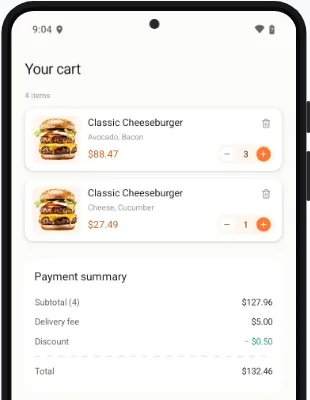
- Expected
- Confirm the price summary shows a subtotal, delivery fee, and grand total that reflect all items
- Actual
- Cart subtotal does not match the sum of line prices — overstates by $1.50 per cart line, inflating the grand total.
See what mini flags on your app.
Audits come with every plan, for iOS and Android apps. Book a demo and we switch them on for your app.