
Enterprise regression spans web and mobile apps, Android TV, browsers, geography, CMS variation, and feature flags. Multi-day regression cycles leave more patches ready for release than your team can verify. A checkout change may pass on iOS while an Android keyboard hides the payment button, and repairing broken scripts leaves less time to check either. AI coding tools like Cursor and Claude Code widen that testing gap. Minitap's AI QA employee writes and runs regression scenarios, proposes test updates when the app changes, and compresses multi-day enterprise regression.
TLDR:
- The testing gap grows when AI coding tools produce changes faster than teams can verify them.
- Check your tests against requirements: AI-generated code and tests can repeat the same error.
- Block release-branch merges when regression checks fail or are missing.
- Score impact and likelihood from 1 to 3, multiply them, and test the highest-risk journeys first.
- Minitap's AI QA employee writes and runs regression scenarios on web and mobile, and proposes test updates your team reviews.
How Cursor And Claude Code Changed The Way Developers Ship Code
AI coding tools like Cursor and Claude Code go beyond autocomplete: they generate code, edit files, and refactor across multiple files. Developers describe a task, supply repository context, and review the proposed patch. The work moves from typing individual lines to directing and checking coordinated changes.
Stack Overflow's 2026 survey reports coding assistants and agents as the dominant AI use case at 66% of developers, ahead of general-purpose LLM-powered chatbots at 63%. That adoption makes patch review a routine part of AI-assisted development, and understanding vibe coding failures helps explain why developers must check changes that can span several files at once.
The Testing Gap Created By AI Coding Tools
The testing gap is the widening distance between how fast AI coding tools write code and how fast teams verify it as correct and safe.
Sonar's 2026 survey of over 1,100 professional developers puts AI's share of committed code at 42%. While 96% do not fully trust AI-generated code, only 48% always verify it before committing.
Security testing makes the stakes concrete: across more than 150 LLM tested, Veracode reports that only 55% of AI-generated code passes basic security tests. A completed patch is not evidence that its behavior is safe to ship, which raises the question of who verifies AI coding agents.
Why AI Generated Code Is Harder To Test
AI coding tools widen the testing gap when generated code and tests share the same mistaken assumption. Compilation checks syntax and types, not requirements. A discount change can compile and pass a happy-path checkout test while leaving failures unchecked:
- Plausible but wrong logic: the code applies the discount before tax when the requirement specifies after tax. A generated test can repeat that error.
- Unrequested side effects: a helper adds a dependency or mutates the shared cart object, altering later calculations.
- Distant regressions: a shared pricing change affects subscription renewals as well as checkout. Tests focused on checkout leave renewals unchecked, a common gap in ai pair programming workflows.
The Hidden Cost Of Maintaining Test Scripts In An AI Coding Era
With script-based automation, your team owns test maintenance, and the cost of maintaining Appium and Espresso suites grows as these tools execute predefined steps against UI targets. When AI coding tools change those targets or journeys, scripts may need repairs before testing can resume.
| Product change | Potential script repair |
|---|---|
| Element identifier changes | Update the locator |
| Checkout gains a confirmation screen | Revise steps and assertions |
| Login flow changes | Repair shared setup across affected tests |
Stable identifiers reduce breakage, but they cannot close the testing gap when changes outpace repairs. Each new scripted journey adds another path engineers must keep aligned with the app, compounding the burden of regression testing for mobile apps.
Why Mobile Apps Feel This Testing Gap Most Acutely
On mobile, changes from AI coding tools need separate verification on iOS and Android because UI frameworks and OS behavior differ. Passing on one leaves the other unverified.
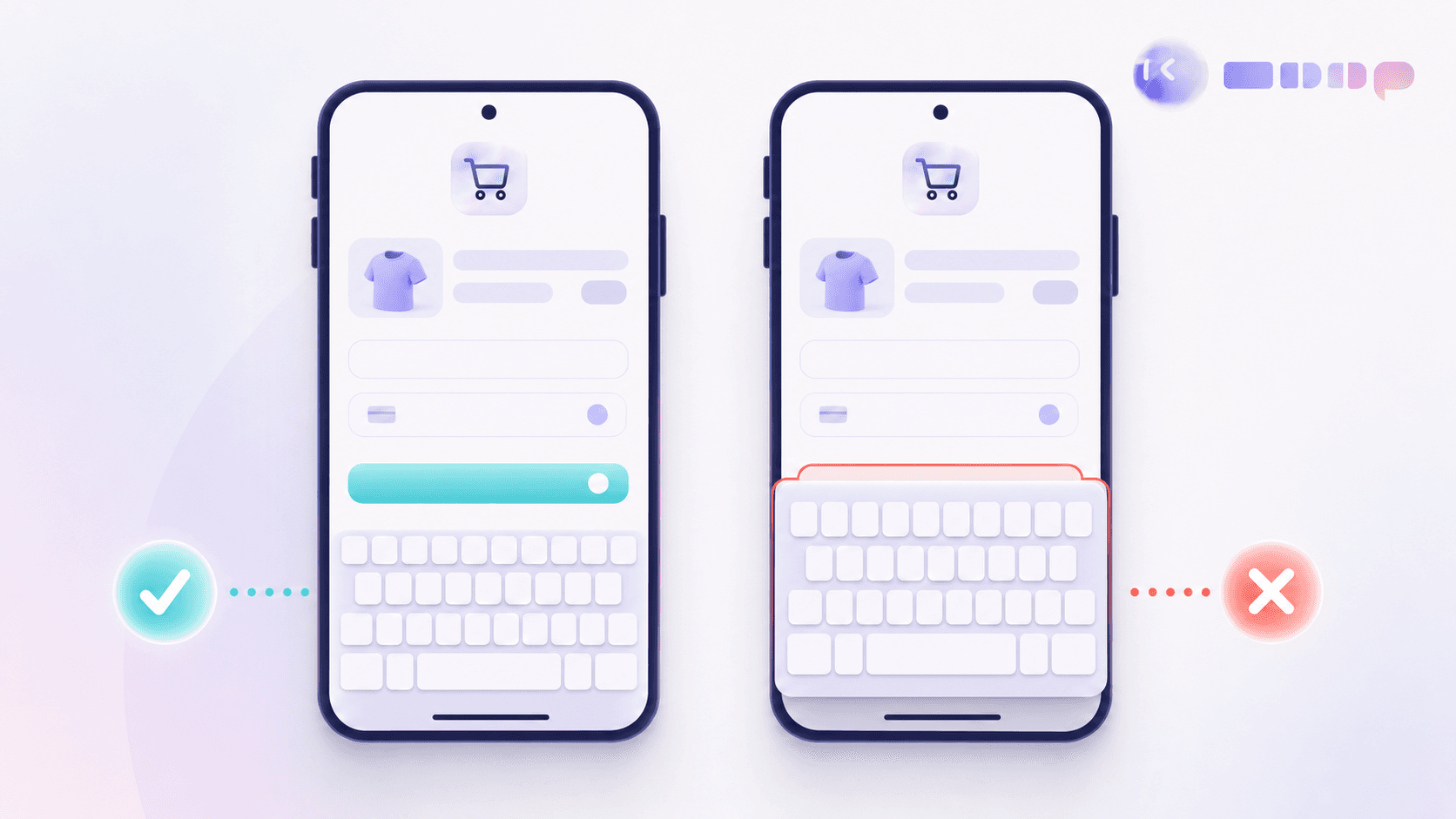
The testing gap spans conditions that break user flows:
- Permission behavior varies by OS version; denied camera access can strand an upload.
- Screen size affects whether the keyboard hides a checkout button, a frequent trigger when teams try to fix flaky mobile UI tests.
- Under memory pressure, the OS can terminate a backgrounded app, leaving users without their cart on return.
Store review cycles also gate corrective updates. When changes arrive faster than these checks finish, verification becomes the release bottleneck.
Building A Regression Safety Net That Keeps Pace With AI Code Generation
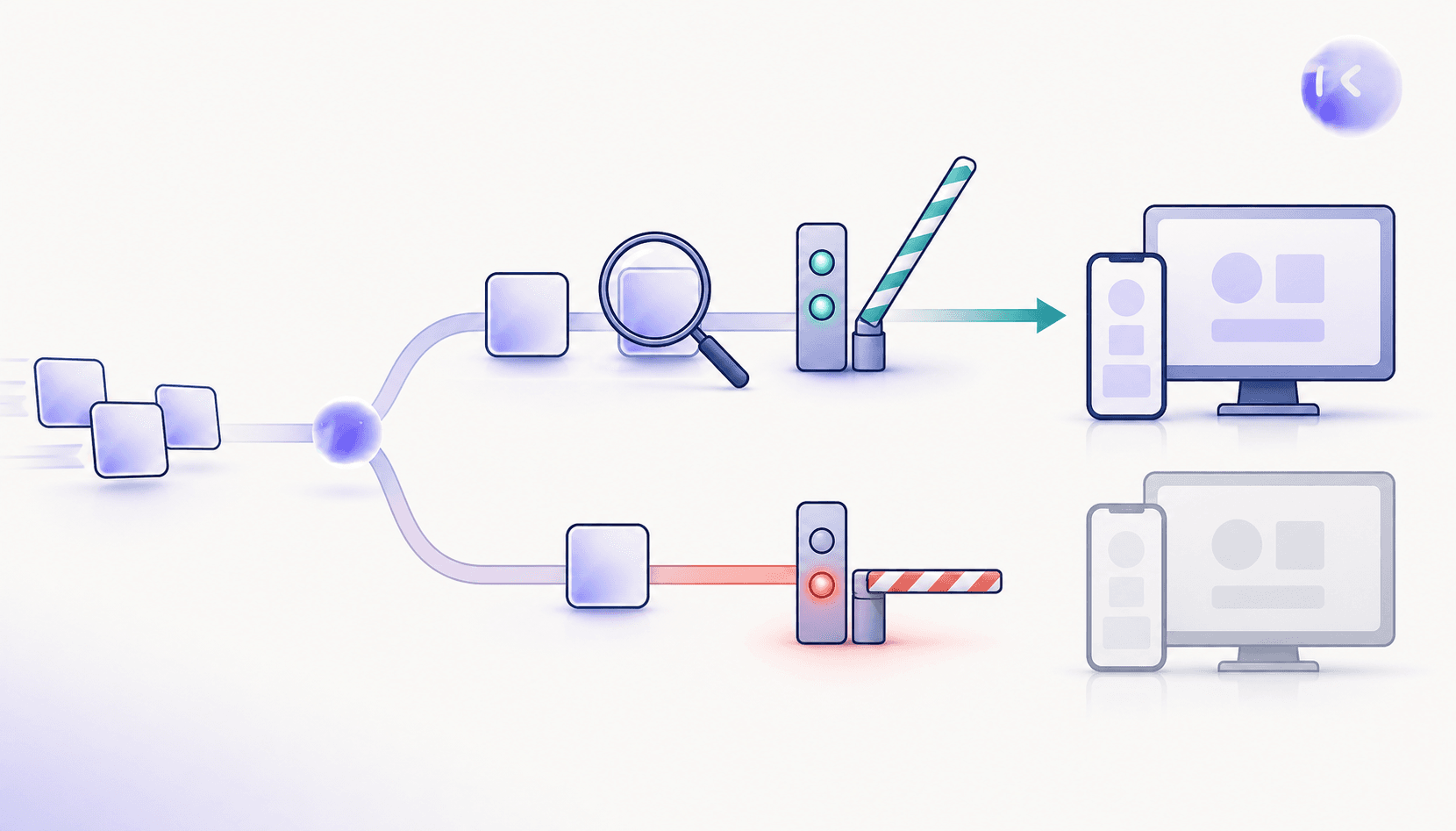
Turn production incident reproduction steps into a regression test with an explicit expected result. Wire it into a mobile and web CI/CD pipeline to narrow the testing gap:
- Run regression suites on every pull request, including the incident case.
- Make regression results required status checks.
- Block release-branch merges on failed or missing checks; require fresh checks after changes.
AI coding tools do not guarantee faster delivery. METR marks the results of its early controlled developer study out of date and points to newer early-2026 results, so treat that study as a historical snapshot rather than evidence about current AI coding productivity. Consider software defect costs tied to AI-generated code when assessing delivery gains. Track elapsed time through verification and rework before claiming delivery gains.
What AI Augmented Testing Looks Like In Practice
AI-augmented testing applies AI to verification, helping close the testing gap as AI coding tools increase code output. Judge each technique by the work it produces:
- AI-assisted test case generation drafts scenarios from requirements or code changes, including boundary inputs and expected outcomes.
- Coverage analysis compares changed behavior with existing tests, flagging unchecked paths such as a new cancellation branch.
- Self-healing tests attempt to adapt element targeting after UI changes, reducing manual locator rewrites.
For self-healing, finding a renamed button preserves execution; accepting a changed result changes the test's meaning, which is why matching testing speed to AI code generation requires discipline. Keep a record of what adapted and whether the original assertion still holds.
Closing The Gap Between Code Velocity And Test Coverage
Make test coverage a release-scope decision: if a changed journey lacks verification, remove the change or hold the release. Assign a coverage owner during planning, before implementation starts.
Order regression by user impact. Payment failures and account lockouts come before cosmetic defects. Score each changed journey’s impact and likelihood from 1 to 3, multiply the scores, and test the highest results first. Break ties by customer exposure.
Track verified release candidates against incoming candidates each cycle. When AI coding tools accelerate arrivals beyond testing capacity, the testing gap grows. Reduce batch size or increase capacity; a fixed testing deadline cannot clear an expanding queue, a core lesson of the AI-native SDLC.
How Minitap Closes The Testing Gap For AI Accelerated Teams
Minitap closes the testing gap with an AI QA employee that writes and runs regression scenarios as AI coding tools accelerate changes. It understands product expectations, tests through real interfaces, and proposes test updates when the app changes, so engineers review changes instead of repairing suites.
For enterprise teams facing a multi-day Android or iOS regression with a small QA team, Minitap compresses that regression across web, iOS, Android, Android TV, browsers, geography, CMS variation, and feature flags. When testing is blocked, Minitap provides context and recommends next actions instead of silently skipping tests.
FAQ
What does Minitap need to test a release built with Cursor or Claude Code?
Minitap needs the release build, the relevant requirements and tickets, the pull request or release scope, and the configuration details that change expected behavior, such as test accounts, geography, CMS state, and feature flags. Minitap's AI QA employee reads that context to write and run regression against the correct product expectations, instead of testing against assumptions a generated patch might have gotten wrong.
Can we move from Maestro or Appium to Minitap without rebuilding our regression suite?
Yes. You can upload your existing test cases (CSV or Excel) and product requirements as context, and Minitap writes scenarios with acceptance criteria and runs them through real interfaces instead of predefined scripts. When the app changes, it proposes test updates and your team reviews only what it cannot settle on its own, closing the gap that script maintenance creates as AI coding tools increase the pace of change.
How can we tell if Minitap is actually closing the gap between AI-generated code and our test coverage?
You can tell Minitap is closing that gap by comparing elapsed regression time, engineering hours spent repairing tests, and the backlog of release candidates awaiting verification across releases with similar scope. Minitap supplies a video of each run, written findings, and blocker recommendations, so you can check completed coverage against release scope instead of just counting passing tests.
How does Minitap cut down the engineering time spent maintaining regression tests?
Minitap reduces regression test maintenance for your engineers. Because it understands product expectations from your specs, tickets, and documentation instead of following hardcoded selectors, it proposes test updates as AI coding tools ship UI changes, so your team reviews proposed changes instead of repairing locators or rewriting test steps after every release.
Does Minitap test both mobile apps and web user journeys?
Yes. Minitap tests web, iOS, Android, and Android TV apps with the same black-box, vision-based approach, so a checkout flow can be verified across iOS, Android, and web without separate test logic for each.
Final thoughts on Keeping AI Code Verified
Your testing gap grows as unchecked changes pile up. You need verified releases, not a longer repair queue. Give Minitap the regression work: it writes and runs the tests and proposes updates your team reviews.