

Manual smoke testing is burning four hours of senior IC time every release, and you're trying to figure out whether fixing that means writing Playwright tests in-house, outsourcing to a managed QA service, or just hiring someone to own the suite full-time. Playwright is a genuinely capable open-source browser automation framework from Microsoft. It supports Chromium, Firefox, and WebKit from a single API, auto-waiting is built into every interaction so tests don't fail due to component load timing, and the trace viewer gives you step-by-step visual replay of any test run. The Playwright testing tutorial material is strong, the framework communicates directly with browsers over WebSocket instead of routing commands through WebDriver HTTP requests, and Microsoft Playwright Testing offers cloud execution if parallelizing workers and keeping binaries current becomes infrastructure overhead you want off your CI machines. For web application testing across multiple browsers, Playwright is one of the more capable script-based options available. What it is not is a solution that removes test authorship or maintenance from your team's workload. Your team still writes every test, debugs every failure, fixes every selector when the UI changes, and decides what gets covered as the app evolves. The Playwright automation course content and the Playwright testing certification programs teach you how to use the tool. They do not teach you how to keep a suite running when selector drift accumulates silently, flake triage becomes a recurring sprint tax, or coverage stagnates because no one planned the next layer of stateful flows. This is what Playwright does well and where it leaves your team on its own.
TLDR:
- Playwright uses a persistent WebSocket connection to control browsers, which removes the HTTP round-trip overhead that slows Selenium down, though your team still owns every test it runs.
- Setup takes five minutes with
npm init playwright@latest, and built-in auto-waiting removes manual sleep calls that cause timing failures in other frameworks. - Your team writes every test, debugs every failure, and owns selector maintenance when the UI changes. There's no vendor absorbing that load.
- Microsoft Playwright Testing runs your suite on Azure infrastructure at $0.01 per test minute for Linux, removing infrastructure overhead but not authorship or maintenance work.
- Minitap runs AI-driven testing on every build, with no selectors to maintain or scripts to rewrite when the UI changes.
What Playwright Is and How It Works
Playwright is an open-source browser automation framework built by Microsoft. Instead of routing commands through WebDriver, it talks directly to browsers over the Chrome DevTools Protocol, giving it faster and more stable control over browser behavior.
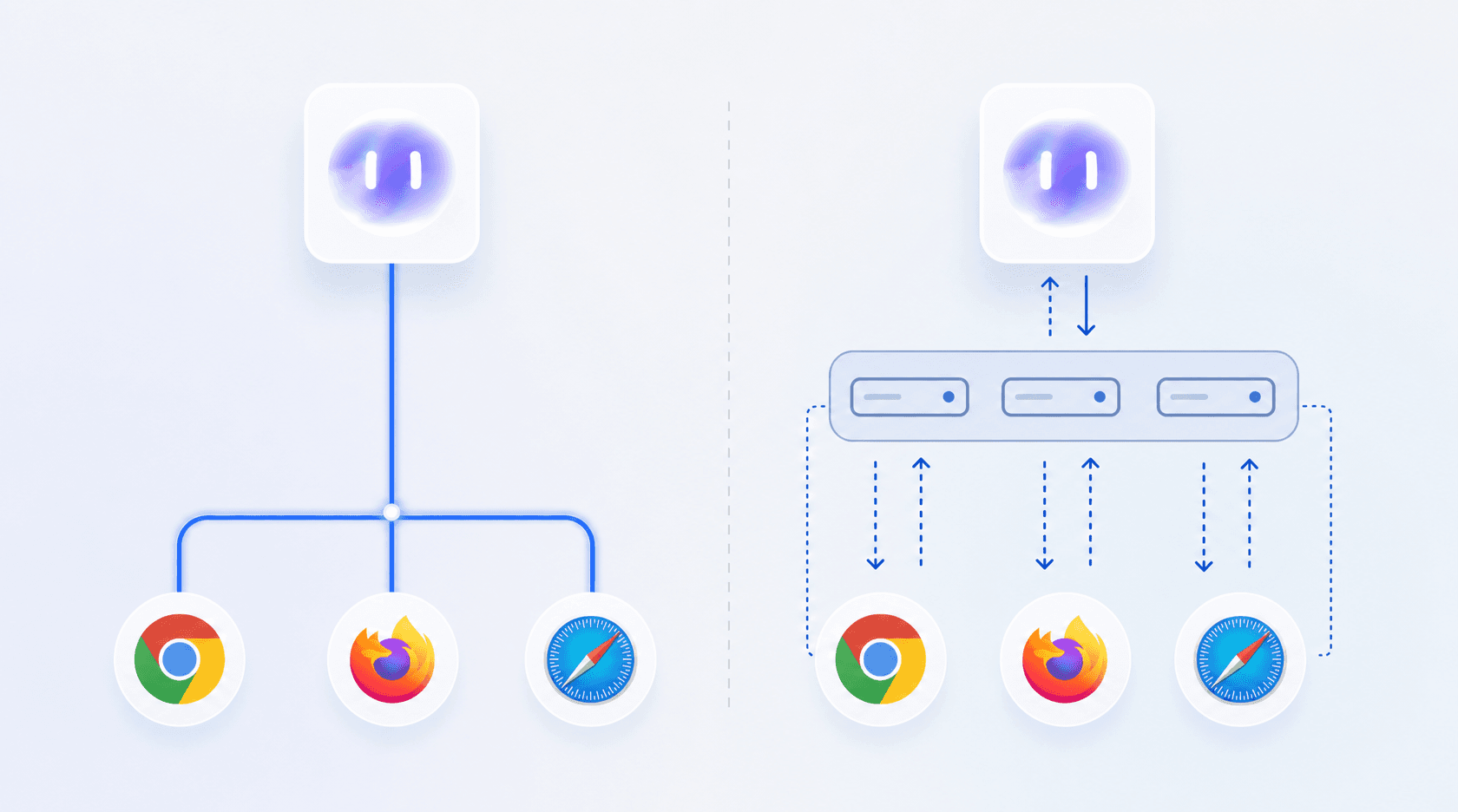
A single API drives Chromium, Firefox, and WebKit, so one test suite covers all three without rewriting anything for each browser. Auto-waiting is built into every interaction: before clicking or typing, Playwright waits for the target element to be visible, stable, and ready to receive input. That removes a whole class of timing failures that make browser tests unreliable. Flexible locators find elements by role, label, or visible text, making tests easier to write and less fragile when the UI changes.
The framework is open-source and Microsoft-maintained, which matters for teams considering longevity and support.
Key Features That Set Playwright Apart
Playwright ships with a few capabilities that genuinely change how teams write and run tests.
Auto-waiting is the clearest one. Instead of manually sprinkling waitForSelector calls or fixed timeouts throughout your test scripts, Playwright waits for elements to be visible, ready, and stable before acting on them. Tests fail less often for the wrong reasons.
Cross-browser coverage runs from a single API. Chromium, Firefox, and WebKit all execute under the same test code, so a bug that only surfaces in Safari gets caught before it ships.
A few other features worth knowing:
- Network interception lets you mock API responses or block specific requests directly in your test setup, without spinning up a separate mock server.
- The Playwright Codegen tool records browser interactions and generates test code automatically, which is a reasonable starting point for teams new to playwright automation.
- Trace Viewer captures screenshots, DOM snapshots, and network logs for every test run, so debugging a failure means replaying exactly what happened instead of guessing.
- Parallel execution is built in. Tests run across multiple workers by default, which keeps CI times manageable as your suite grows.
These features explain why playwright testing has gained real traction among web teams. The tooling is well-considered and the defaults are sensible for teams who have the bandwidth to own the suite.
Setting Up Playwright: Installation to First Test
Getting Playwright running takes about five minutes. You need Node.js installed, then run one command to scaffold the whole project:
The setup wizard asks where to put your tests, which language to use (JavaScript or TypeScript), and whether to add a GitHub Actions workflow. The defaults are sensible. Browser binaries install automatically, so there's nothing else to download manually.
Once scaffolded, you get a working sample test file. A basic test looks like this:
The page object handles navigation, clicks, and assertions. Each test runs in its own isolated browser context, so state never bleeds between tests. To run the suite:
Tests run headless by default. That's the right setting for CI. To watch execution while iterating locally, add --headed:
After the run, Playwright generates an HTML report you can open with npx playwright show-report.
Where Playwright Excels: Speed, Reliability, and Cross-Browser Coverage
Playwright handles the mechanics of browser automation well. Tests run in parallel across Chromium, Firefox, and WebKit without extra configuration, and the built-in auto-wait removes the manual sleep calls that make Selenium suites fragile. For teams running CI pipelines that already have the bandwidth to script and maintain browser tests, that combination handles the mechanics.
A few things Playwright does better than most alternatives:
| Traditional Browser Automation | Playwright |
|---|---|
| Manual waitForSelector calls and fixed timeouts throughout test scripts | Auto-waiting built in: waits for elements to be visible, ready, and stable before acting |
| Separate test code for each browser (Chromium, Firefox, WebKit) | Single API drives all three browsers without rewriting |
| Separate mock server required for API response stubbing | Network interception built in: mock responses directly in test setup |
| Commands routed through WebDriver HTTP requests | Direct WebSocket connection to browsers via Chrome DevTools Protocol |
| Debugging failures means guessing from logs and screenshots | Trace Viewer captures screenshots, DOM snapshots, and network logs for step-by-step replay |
| Manual test scaffolding for new flows | Codegen records interactions and generates test code automatically |
- Auto-waiting on elements means tests don't fail because of component load timing. You write the assertion; Playwright figures out when to check it.
- Network interception is built in, so you can stub API responses or simulate failure conditions without a separate mocking layer.
- Trace viewer gives you a step-by-step visual replay of any test run, which cuts debugging time considerably when a test fails in CI but not locally.
- Codegen records browser interactions and outputs test scaffolding, which lowers the barrier for teams writing their first automated tests.
For web application testing across multiple browsers, Playwright is a capable open-source option, as long as your team is set up to author and maintain the suite. On mobile, every one of those capabilities still leaves selector upkeep, flake triage, and coverage decisions on your plate.
Where Playwright Leaves Teams on Their Own: Maintenance and Skill Requirements
Playwright is a genuinely capable framework, but the ongoing cost of owning it sits entirely with your team. There are no managed updates, no vendor-maintained selectors, and no support queue to escalate flaky runs to. When a test breaks, an engineer debugs it.

The skill floor is real. Writing reliable Playwright tests requires familiarity with async/await patterns, locator strategies, and network interception. Teams without a dedicated QA engineer often find that test authorship falls to developers who already carry a full sprint load.
Maintenance compounds over time:
- Selector drift: UI changes silently break locators, and there's no automatic detection. Someone has to notice the failure, trace it, and fix it before the next release.
- Flake triage: Playwright reduces flakiness with auto-waiting, but timing-sensitive flows still produce intermittent failures that require manual investigation to distinguish from real bugs.
- Framework version upgrades: Playwright ships updates frequently. Keeping the framework, browser binaries, and CI configuration aligned is a recurring task with no shortcut.
For teams running one or two apps with dedicated QA capacity, this is manageable. For teams where testing competes directly with feature work, the maintenance load tends to win.
Microsoft Playwright Testing: The Cloud Execution Option
Microsoft Playwright Testing is a cloud execution service that runs your Playwright suites on Microsoft's infrastructure instead of your own CI machines. It's now part of Azure App Testing.
Pricing is per test minute: $0.01 for Linux and $0.02 for Windows. A free tier covers 30 days and 100 test minutes, enough for a real evaluation run.
Teams use it when browser infrastructure becomes the actual friction point. Parallelizing workers, keeping binaries current, and scaling across CI runs all move off your machines. Your test code stays exactly as written.
Worth being clear about what it solves. Cloud execution removes infrastructure overhead. It doesn't touch authorship or maintenance. Your team still writes every test and debugs every failure, whether those tests run on your servers or Microsoft's.
Connecting to the service takes two steps: set the PLAYWRIGHT_SERVICE_ACCESS_TOKEN environment variable in your CI pipeline, then update playwright.config.ts to point at the service endpoint. Your existing test files stay unchanged. The trade-off is the same as any managed runner: you gain elastic parallelism and skip binary maintenance, but your test authorship, selector upkeep, and failure triage remain internal work.
Common Challenges and Limitations in Real-World Use
Auto-wait handles most timing issues, but flows with animations, lazy-loaded content, or widgets like Stripe Checkout or Intercom chat that render asynchronously still produce intermittent failures that require custom wait logic to resolve.
A few other friction points come up regularly in practice:
- Shadow DOM elements need specific locator patterns that aren't obvious upfront, and debugging through deeply nested component trees takes real investigation time even with trace viewer.
- CAPTCHAs and bot detection block test runs in production-like environments, requiring environment-specific feature flags or third-party bypass services as workarounds.
- Browser extension testing is partial: Chromium supports loading unpacked extensions, but Firefox and WebKit do not.
- Self-hosted CI runners often need manual dependency setup to get browser binaries installed correctly, creating configuration overhead that GitHub Actions users rarely encounter.
Learning Resources: Courses, Tutorials, and Certification
The official Playwright documentation at playwright.dev is the strongest starting point. It covers installation, locator strategies, network interception, and the full API with working examples throughout. For most teams, the docs alone are enough to get a suite running.
For structured learning, YouTube has solid beginner walkthroughs, and LambdaTest offers a Playwright 101 certification (free as of June 2026) that covers the core concepts with a credential at the end. It's a reasonable option if your team wants a defined path over self-directed reading.
Guru99 and similar tutorial sites publish step-by-step guides for Python and JavaScript beginners. Quality varies, but they're useful for picking up specific patterns like page object models or CI integration without reading full documentation pages.
The fastest way to actually learn Playwright is to run Codegen against a real app, read the output, and then start modifying it. Documentation teaches concepts; a generated test file shows you exactly how those concepts apply to your UI.
When Playwright Is the Right Choice (and When It's Not)
Playwright fits teams where developers write JavaScript or TypeScript, the app is web-first, and cross-browser coverage is a real requirement, not a checkbox. Greenfield projects start clean. Teams already running JS-heavy CI pipelines slot it in with minimal friction.
Legacy systems add overhead. Inconsistent selectors, authentication flows that predate modern browser APIs, and test environments that weren't built with parallelization in mind all create friction that the tool itself won't resolve for you.
Beyond Script-Based Testing: What Happens After the Suite Is Written
Getting Playwright running is the easy part. The harder question surfaces a few weeks in: whose job is this now?
Failure triage falls to whoever is closest to the CI run. Coverage decisions default to whoever wrote the initial tests. When a release is two days out and three tests are red, an engineer pulls from sprint work to investigate, not because it's planned, but because someone has to. There's no escalation path and no vendor absorbing that load.
Coverage also tends to stagnate. Teams write tests for the flows they know well and stop there. Playwright gives you the tools to go deeper, into stateful flows, edge cases, low-connectivity behavior, but someone still has to decide to build that coverage and keep it current as the app evolves. The suite doesn't expand on its own.
What you're left with is a test layer that covers happy paths reasonably well and quietly accumulates gaps everywhere else. That's the part no framework solves for you: not the tooling, but the ongoing ownership of what gets tested, who fixes it when it breaks, and how coverage grows without maintenance cost growing at the same rate.
How Minitap Closes the Loop Playwright Leaves Open
Playwright gives your team a capable scripted framework. What it does not give you is any layer between your tests and your users. When a flow breaks in production before your next test run catches it, that gap belongs to you.
Minitap runs AI-driven testing on every build, finding failures before the release ships instead of after. No selectors to maintain, no test scripts to rewrite when the UI changes.
The coverage difference is concrete: a checkout flow that breaks an hour after deploy gets caught on the build that introduced it, not after release, and not in a post-incident review. Your team sees the failure, the affected path, and the reproduction context without writing a single new test.
Final Thoughts on Playwright Testing and What Comes After Setup
Playwright gives you a capable framework and leaves the rest to your team. Writing tests is the easy part. Deciding what gets covered, fixing broken selectors when the UI changes, and triaging intermittent failures under release pressure is where the real cost sits. For teams with dedicated QA engineers and bandwidth to own ongoing maintenance, that trade-off is manageable. Minitap runs continuous testing with no scripts to maintain, finding failures in production before your users do. The question is whether your team has capacity to own the suite long-term or needs that load moved off your plate entirely.
FAQ
Is Playwright easy to learn?
Playwright is easier to set up and run from day one: single command install, auto-waiting built in, no driver binary matching required. If your team writes JavaScript or TypeScript and wants to get tests running fast, Playwright lowers the initial barrier.
Can I build Playwright tests without dedicated QA engineers?
Yes, but be realistic about the time cost. Developers can write Playwright tests using Codegen to scaffold initial scripts and auto-waiting to reduce flake. The skill floor is real though: async patterns, locator strategies, and network mocking take time to internalize, and maintenance falls to whoever is carrying sprint work. Teams without QA capacity often find test authorship competes directly with feature delivery, and coverage stagnates as a result.
What happens after my Playwright suite is written?
Failure triage, coverage decisions, and framework upgrades all become ongoing engineering work. When tests break, someone debugs selector drift or timing issues before the next release. When the UI refactors, someone rewrites locators. When coverage gaps surface, someone decides whether to backfill tests or ship with the gap. Playwright gives you the tooling, but it does not give you the capacity to operate the suite, and there's no vendor absorbing that load.
When should I use Playwright?
Playwright is a natural fit for web work where desktop cross-browser coverage across Chromium, Firefox, and WebKit is the requirement and your team has capacity to write and maintain the scripts. For mobile QA, that ownership cost is the catch: someone still authors every test, fixes selectors when the UI changes, and triages flaky runs. Minitap's AI agent drives your real user journeys on cloud iOS simulators and Android emulators and owns that maintenance for you, so mobile coverage keeps pace without scripts to rewrite.