

Mobile regression rarely fails because a team lacks effort. It fails because a small QA team, sometimes one or two people working with engineers, has to re-check the same journeys on every release across iOS, Android and web, OS versions, environments, CMS content and feature flags. This guide covers how to give that team more regression capacity: who owns what, how to prioritize, how to wire checks into CI, how to keep tests current, and where an AI QA employee like Minitap takes repetitive execution off their plate so they can focus on judgment-heavy work.
TLDR:
- Name a release owner and track how much time each regression cycle takes.
- Score flows by usage, business impact and stability; always run full regression on payment and access flows.
- Test offline recovery and payment retries for lost writes and duplicate charges.
- Tie CI results to build IDs and commits, and require passing checks before merge.
- Minitap's mini writes and runs regression scenarios on web and mobile and proposes test updates, so a small QA team reviews evidence instead of re-running the same journeys.
Who Owns Mobile Regression in a Small Team
With a small QA team, regression is shared between QA and engineering. Without a named release owner, shared responsibility can leave changed flows unchecked.
Make release accountability explicit, then measure the time each regression cycle consumes.
Build setup, repeated execution and failure investigation compete with feature work and with the exploratory testing your QA people are best at. Track that time per release, following these mobile QA practices for teams without a dedicated mobile QA engineer.
Why Mobile Regression Is Harder Than Web Regression
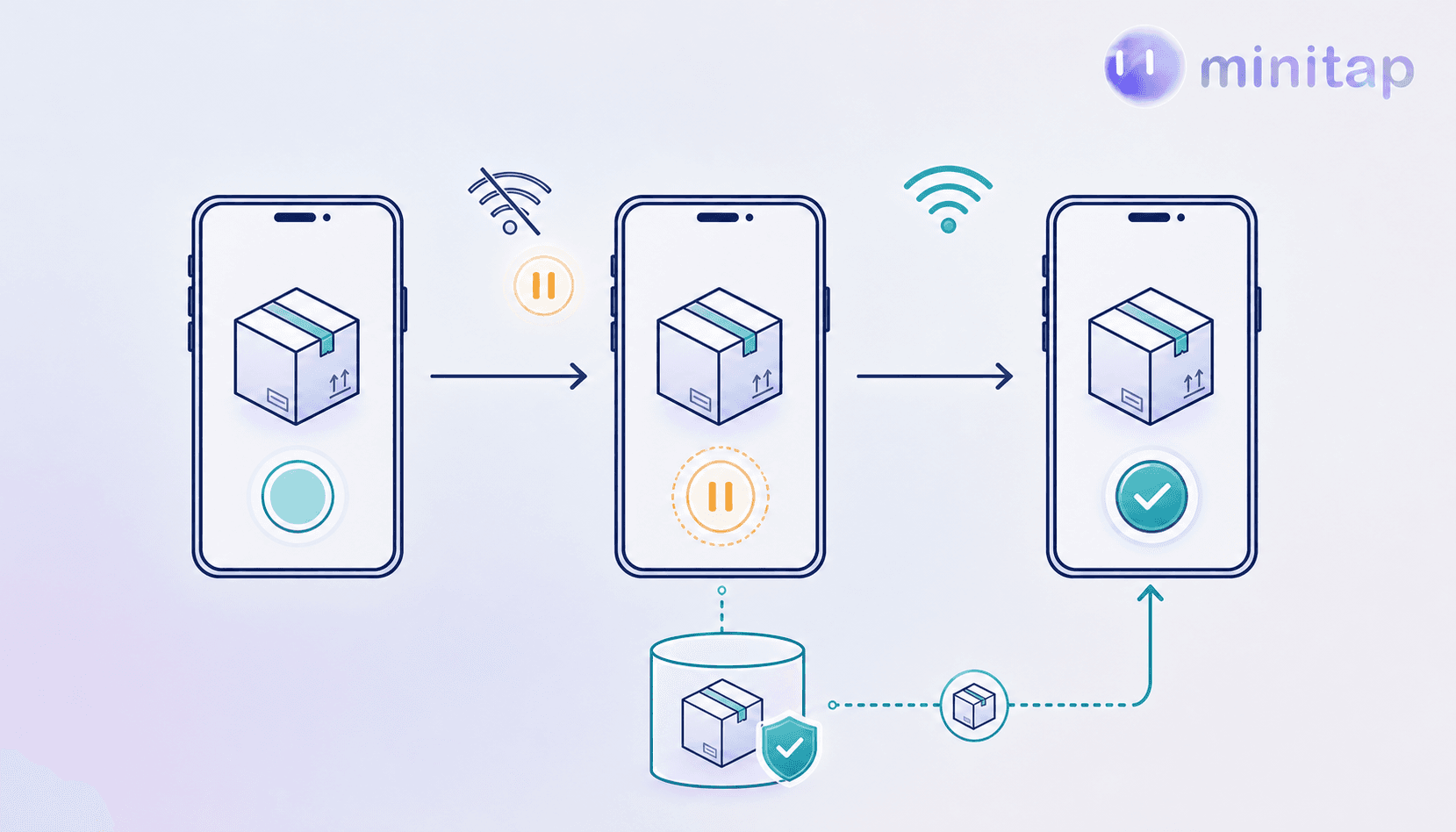
A delivery confirmation can disappear when connectivity drops mid-submit. Mobile regression must cover these transitions and native interfaces, on top of the web journeys many teams also ship.
- OS-specific permission dialogs can break scripted steps.
- Screen sizes and memory pressure change runtime conditions.
- Offline recovery can lose or duplicate writes.
- Several OS versions stay in active use at the same time, so each release has a version matrix to cover.
- App store release gates make it slower to ship a fix after a failure escapes, a core reason mobile regression testing failures are costly to recover from.
Shift Left Testing as the Foundation
A wrong cart total after a discount can overcharge customers. Define the expected result in the ticket before implementation so engineers can verify it before merge.
- During planning, specify inputs and observable outcomes: an expired coupon leaves the total unchanged and displays an error.
- Run unit checks for discount calculations, then integration checks for cart persistence before UI checks.
- Require relevant checks on each PR; fix failures before merging.
- Make passing checks for changed behavior, including error paths, part of the definition of done.
Risk-Based Test Prioritization
A failed renewal can lock paying customers out. Under a release deadline, score flows to set execution order and coverage depth.
| Factor | 1 point | 2 points | 3 points |
|---|---|---|---|
| Usage frequency | Rare | Weekly | Daily |
| Business impact | Inconvenience | Task blocked | Payment or access blocked |
| Historical stability | Reliable, unchanged | Recently changed | Repeated defects |
Per this regression testing guide, starting thresholds: 7 to 9 gets full regression across relevant configurations; 3 to 6 gets targeted checks. Payment or access blockers always get full regression.
Subscription renewal scores: daily usage (3) + payment or access blocked (3) + reliable, unchanged (1) = 7.
Building a Mobile Regression Checklist
A notification opening the wrong order shows users stale information. Tie the checklist to each build; update it when configurations or OS support change.
- Record supported iOS and Android versions and results per combination.
- Verify core journeys reach expected final states.
- Deny, grant and revoke permissions; check recovery.
- Test push notifications and deep links with apps closed and running.
- Check payment success, cancellation and retry without duplicate charges.
- Verify screen reader labels, focus order and enlarged text.
Require recorded results and release-owner disposition of failures and blockers, as outlined in this regression tests guide for mobile teams.
Automated Regression Coverage: Approaches
Maintenance comes first. For regression testing for mobile apps, compare who keeps tests current and what breaks when the UI changes.
| Approach | Setup and upkeep | UI change sensitivity |
|---|---|---|
| Espresso, XCUITest | Engineers maintain native tests | Identifier changes break lookups |
| Appium, Maestro | Teams maintain scripts or flows and device execution | Locator changes break steps |
| Visual regression | Teams maintain image baselines | Layout changes require review |
| AI QA employee (Minitap) | Team provides context and reviews proposed test updates | Visual verdicts; behavior changes lead to proposed updates |
Integrating Mobile Regression Into CI/CD
Wire mobile regression into CI/CD for mobile and web so every pull request and merge triggers tests against a traceable app artifact.
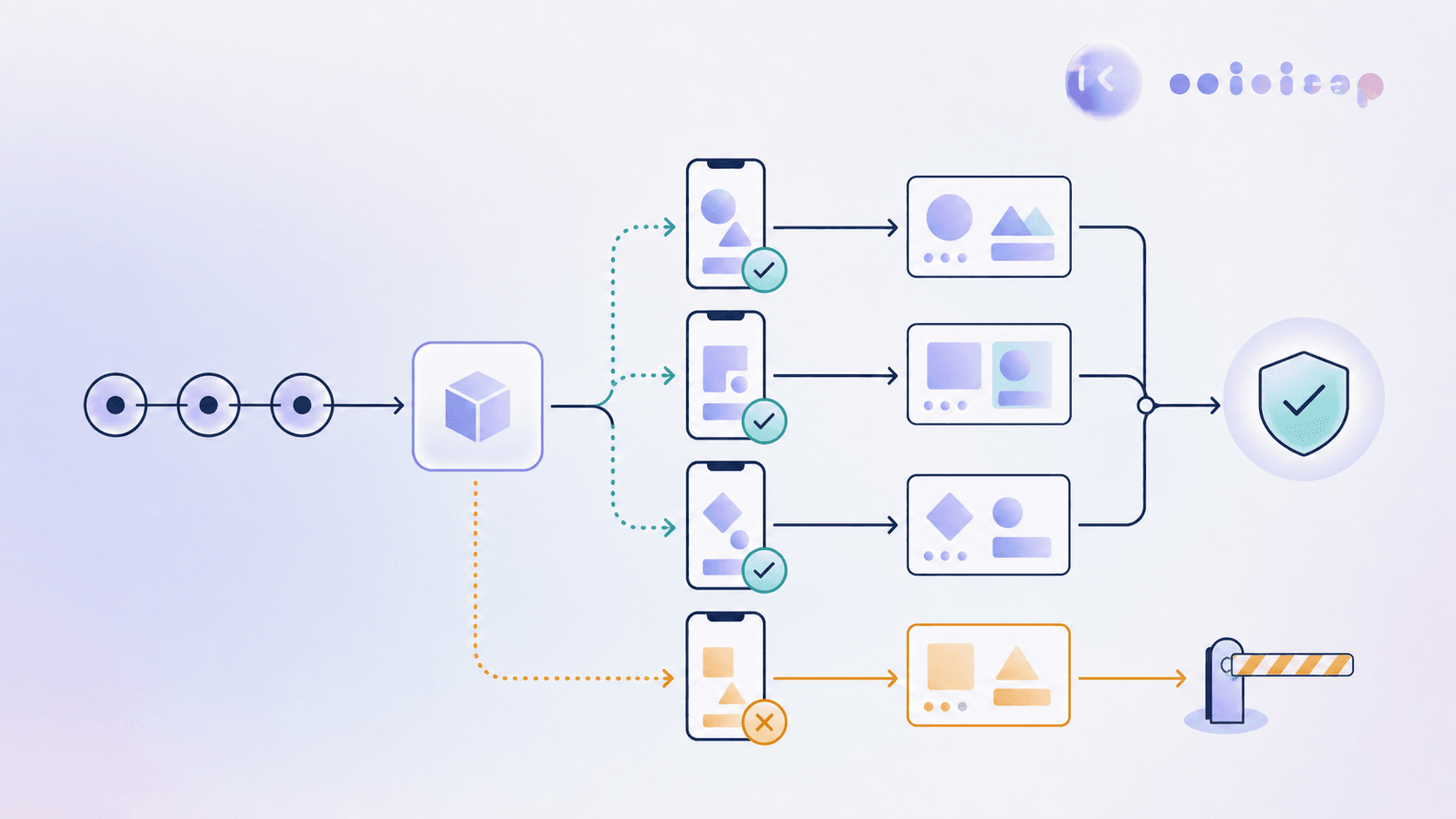
- Build the iOS or Android app, send it to your test runner (simulators, emulators or devices), and pass its build ID to the test job.
- Run suites in parallel with isolated accounts and test data to prevent shared-state collisions.
- Attach results to the commit. Require passing checks before merge; blocked runs stay unresolved until someone decides.
- On merge, run the broader suite and keep failure evidence before release promotion.
Managing Test Upkeep as the App and OS Versions Change
An obsolete checkout assertion can block a valid release while a new payment flow goes unchecked. With scripted suites, engineers and QA own upkeep as features and OS behavior change.
For existing scripted suites:
- Use stable accessibility identifiers and assert user outcomes, avoiding coordinates and nested selectors.
- Share login and checkout modules so UI changes need fewer repairs.
- Prune retired features and unsupported OS branches every quarter.
- Update expectations alongside feature changes to prevent coverage debt.
Where an AI QA Employee Adds Capacity
Minitap is an AI QA employee built to compress multi-day regression. Your QA team's judgment stays at the center: mini takes on the repetitive part so the team can spend more time on exploratory testing, edge cases and release decisions.
Its agent, mini, builds an understanding of the product from the context the team provides: specs, tickets, documentation and existing test cases, which you can upload as CSV or Excel. mini writes test scenarios with acceptance criteria, runs them as black-box visual tests on web, iOS and Android, plus Android TV where enabled, and investigates unexpected behavior beyond the predefined steps. When the app changes, mini proposes updates to its tests and asks the team to review only the changes it cannot settle on its own. See how this works for regression testing.
Every run comes with a video and findings. When a finding is not a bug, the team marks it "Not a bug" with a short reason and mini takes it into account on the next run. When a run is blocked, mini explains why and recommends the next action, so the release owner decides with evidence in hand.
QA Metrics to Track
Track these metrics across releases with consistent scope and denominators:
- Escaped defect rate: production defects per release. Increases point to missed regression scenarios.
- Regression cycle time: elapsed time from run start to reviewed results. Growth signals slower release feedback.
- Flaky test rate: inconsistent tests divided by tests run. Increases weaken trust in results, which is why teams work to fix flaky mobile UI tests.
- Critical flow coverage: verified critical journeys divided by those in scope. Declines expose untested flows.
- Time spent on repeated execution vs exploratory testing: the share your QA team gets back is the capacity you gained.
FAQ
How can a small QA team cover more mobile regression?
Name a release owner, prioritize flows by risk, gate merges on CI checks, and move repetitive execution to automation. Minitap's mini writes and runs regression scenarios on web and mobile and returns a video and findings per run, so the QA team reviews evidence instead of re-running the same journeys by hand.
Where do QA engineers fit when Minitap runs regression?
At the center. Minitap gives a QA team more regression capacity. mini proposes test updates and asks the team to review what it cannot settle, findings can be marked "Not a bug" with a reason, and release decisions stay with your people.
Should we switch from our Appium or Maestro suite all at once?
No. Run Minitap on a defined release scope next to your existing suite. Compare results for the same build, critical journeys and configurations, including payment retries and permission recovery, then decide journey by journey.
How do we check regression coverage after a production bug?
Give the defect ticket, affected build, account state and expected outcome as context, then check the findings against the original failure conditions. For duplicate charges after a network interruption, verify payment retry behavior and the final transaction state across relevant configurations. Each Minitap run includes a video, so the result can be reviewed.
Final Thoughts on Mobile Regression for Small QA Teams
A small QA team does not need to shrink its ambitions; it needs more regression capacity and clear ownership of release decisions. Put the basics in place, then let Minitap take on repetitive regression across web and mobile while your team focuses on the testing that needs human judgment.