

Your team can ship features in hours using AI coding tools like Cursor and Claude Code, but your testing layer still takes days to catch up. Manual smoke testing eats four hours of senior IC time per release. Script-based automation breaks every time your UI changes. The gap between how fast code gets written and how fast it gets tested is now your actual release constraint. For teams shipping weekly or faster, this is the complete reference on closing the testing gap without adding headcount or slowing down releases.
TLDR:
- QA testing catches bugs before users do. A checkout crash in testing costs nothing; in production it can drop a day of revenue and tank your app store rating within 48 hours.
- Manual testing burns engineering time on every release; Minitap's autonomous agent handles regression coverage, new feature flows, and repetitive checks in about one hour with zero team overhead.
- Entry-level QA salaries range from $47,795 to $60,000; automation skills push mid-level to $65,000-$85,000 and senior roles above $90,000.
- AI coding tools now generate features faster than script-based tests can keep up, and test maintenance consumes growing engineering time as UI changes break selectors.
- Minitap reads your app from source, maps test scenarios automatically, and delivers full regression reports in about one hour without requiring your team to write or maintain tests.
What Is QA Testing and Why It Matters
QA testing is the practice of checking software against its requirements before it reaches users, covering the mobile app testing basics every engineering leader should know. A tester runs the product through defined scenarios, records what breaks, and hands findings back to engineering for a fix. That cycle repeats until the build meets the release bar.
The business case is straightforward: a bug caught during testing costs nothing but time. That same bug in production can drop a day of revenue, trigger a wave of negative reviews, and push your app's store ranking down, often within 48 hours.
Types of QA Testing Every Engineering Team Should Know
Each testing type solves a different problem. Knowing which one fits your situation saves you from running the wrong tests and missing the failures that actually matter.
Functional vs. Non-Functional Testing
Functional testing checks whether the software does what it is supposed to do. A user submits a form, the record saves. A payment goes through, the confirmation screen appears. Non-functional testing checks how it performs under pressure: load, speed, security, accessibility.
Testing by Scope
- Unit testing isolates individual functions or components and verifies their logic in isolation, catching bugs before they compound into larger failures.
- Integration testing checks that separate modules communicate correctly, which is where assumptions between teams tend to break.
- End-to-end testing runs full user flows from login to completion, catching failures that only appear when the whole system is operating together.
- Regression testing for mobile apps re-runs existing coverage after a change to confirm nothing that worked before is now broken.
Manual vs. Automated
Manual testing is fast to start and good for exploratory work where the tester is actively looking for unexpected behavior. Automated testing runs the same flows repeatedly without human input, which makes it the right choice for regression coverage on anything that ships more than once.
Shift-Left and Continuous Testing
Shift-left moves testing earlier in the development cycle. Catching a requirement conflict during design costs nothing. Catching it in UAT costs a sprint. Continuous testing keeps that coverage running in CI so failures surface at the commit that caused them, not at the release that ships them.
The QA Testing Process: From Requirements to Release
QA testing follows a structured cycle that repeats with every release. Understanding each phase tells you where your team is losing time and where defects are slipping through.
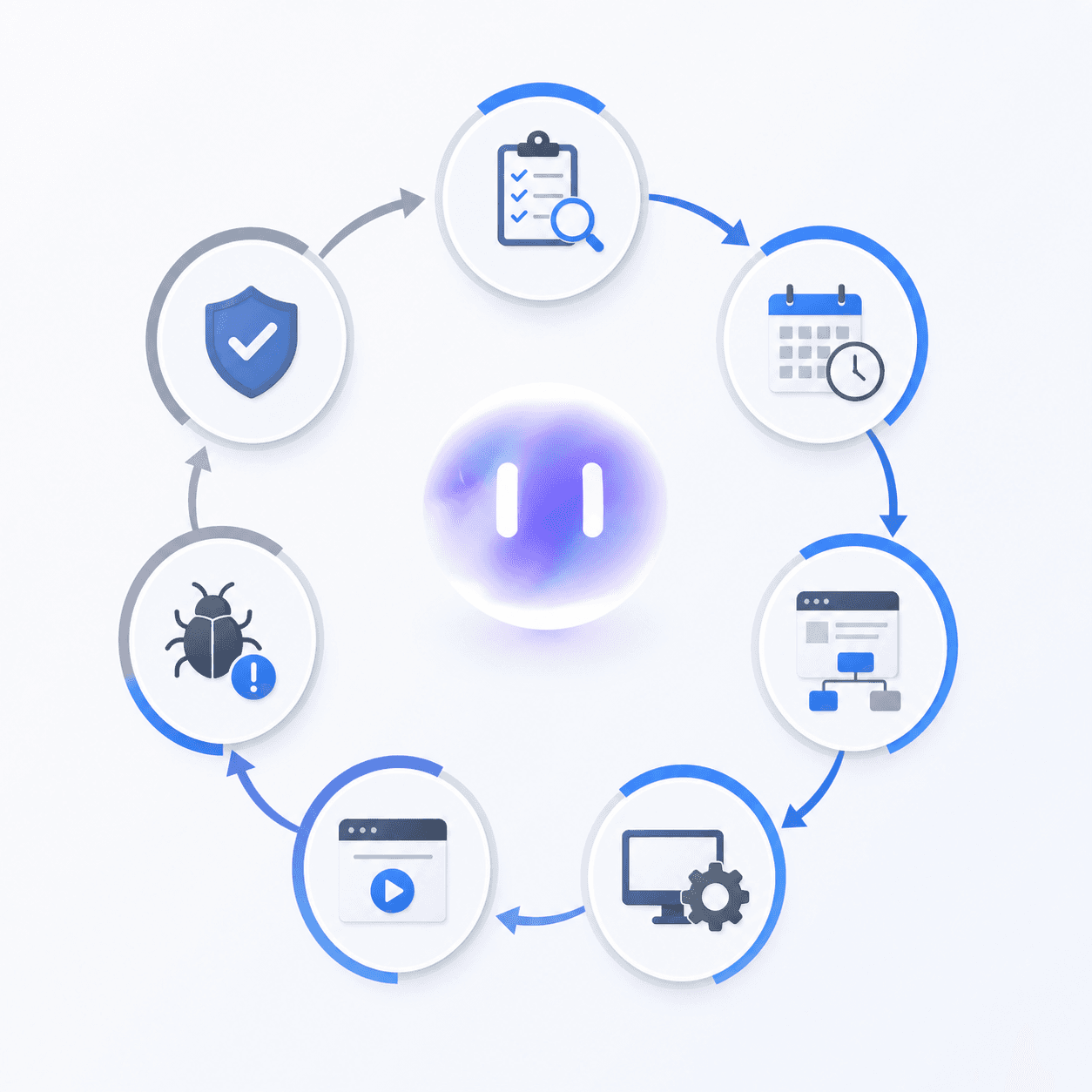
Here is how the process runs in practice:
Requirements Analysis
The team reviews functional specs, user stories, and acceptance criteria before a single test is written. Catching a requirement conflict here costs nothing. Catching it in UAT costs a sprint.
Test Planning
Scope, resource allocation, risk assessment, and exit criteria get documented. This is where you decide what gets tested, in what order, and what a passing release looks like.
Test Case Development
Testers write cases covering preconditions, numbered steps, expected results, and priority tags. Test data needs to cover boundary conditions beyond the happy path.
Environment Setup
Test environments, data fixtures, and access credentials get configured. Gaps here produce false failures that waste triage time.
Test Execution
Cases run, defects get logged with reproduction steps, and results get tracked against the plan.
Defect Reporting and Retesting
Developers fix reported issues, testers verify the fix, and regression checks confirm nothing adjacent broke.
Test Closure
The team documents what ran, what was skipped, what failed, and why. This output feeds the next planning cycle.
The phase where most teams lose the most time is execution: the manual regression work that runs on every release regardless of what changed.
QA Testing Tools and How to Choose the Right Stack
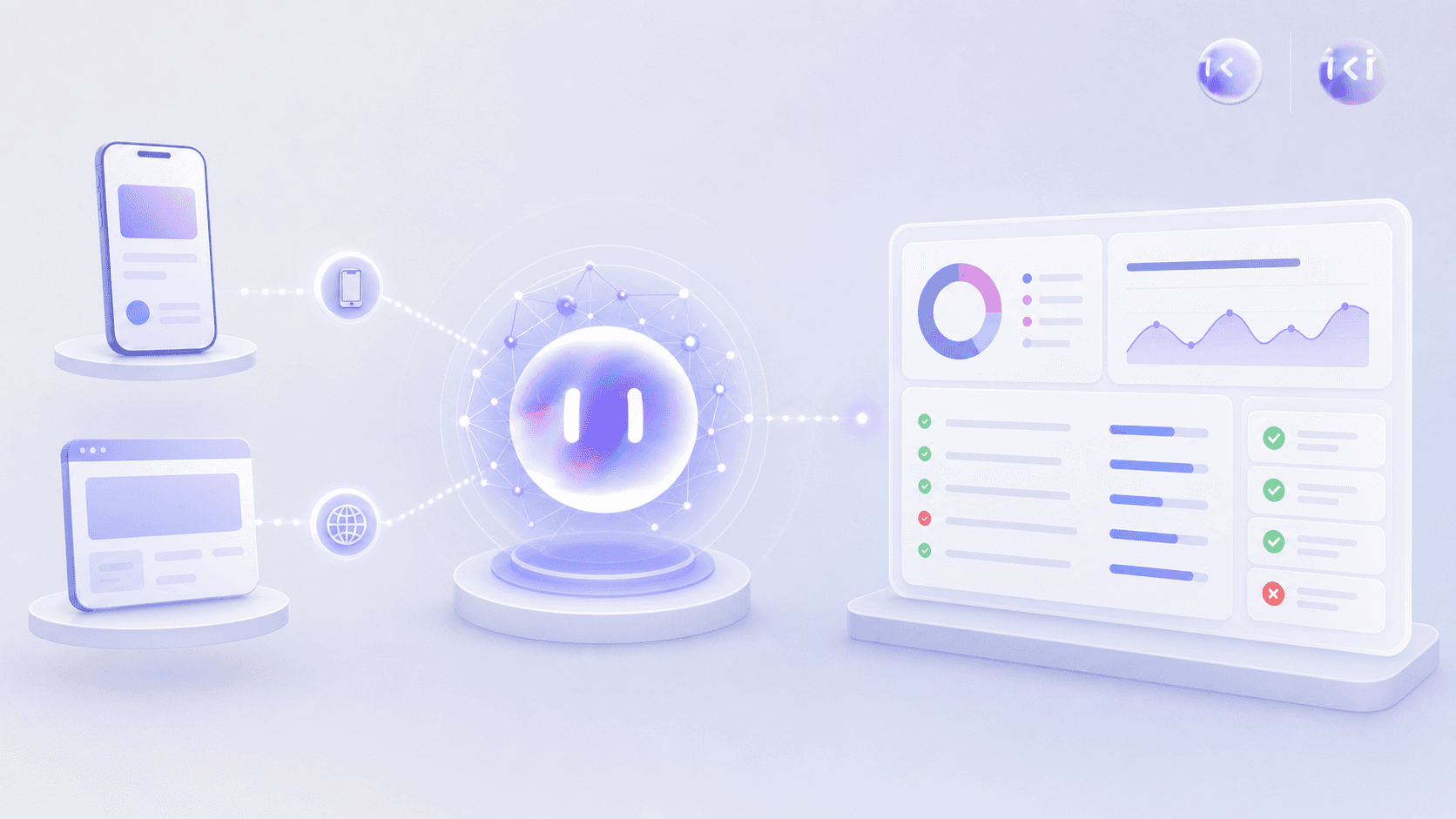
The right stack depends on what you're testing, who owns maintenance, and how fast you ship. Most teams run some combination of manual checks, script-based automation, and increasingly, autonomous AI agents that generate and maintain tests without human input.
Categories Worth Knowing
There are four broad categories in active use:
- Manual testing tools (TestRail, Zephyr, Qase) track test cases and execution results but require a person to run every check.
- Script-based mobile application testing frameworks (Selenium, Cypress, Playwright for web; Appium, Espresso, XCUITest for mobile) give you full control over test logic but your team writes, runs, and fixes everything.
- Codeless automation tools (Katalon, Testim) reduce the scripting burden but still require ongoing maintenance when your UI changes.
- Autonomous QA agents like Minitap read your app from source, map all test scenarios automatically, and keep coverage current without your team touching the suite. Minitap owns authorship and maintenance, and gives full transparency. Every run ships a session trace, screenshots, and a written explanation of each finding.
How to Choose
Ask three questions before committing to any tool:
- Who owns maintenance when the UI changes? Script-based tools put that on your engineers. Minitap handles it autonomously.
- How fast do you ship? Teams releasing weekly or faster need a testing layer that keeps pace. Manual cycles and fragile selectors become bottlenecks fast.
- What are you testing? Web, mobile, or both? Minitap covers both from a single integration, which matters if you're maintaining parallel test suites today.
Manual Testing Versus Automated Testing: When to Use Each
The question of manual versus automated has a clear answer for any team shipping on a regular cadence: autonomous testing removes the overhead from both approaches without sacrificing the coverage either one was trying to deliver.
Autonomous QA agents like Minitap test real user flows by interacting with a live build, detecting functional breaks, UX regressions, memory leaks, and usability friction that legacy approaches miss entirely. The agent reads your app from source, maps test scenarios automatically, and catches issues including confusing button placements, broken flows, layout problems, and accessibility gaps, all without requiring engineers to touch the test suite.
Manual testing burns engineering time on repetitive checks that could run autonomously. Script-based automation requires constant selector maintenance, breaks when the UI changes, and still misses the runtime issues and UX problems that matter most. Autonomous testing removes both burdens: zero maintenance overhead, zero selector rewrites, and full coverage that includes the judgment calls teams used to reserve for manual passes.
QA Testing Salaries and Career Paths
Salary ranges vary depending on the source and how the role is titled. ZipRecruiter's QA tester salary data puts the US average at $89,334 annually, while Glassdoor's QA tester survey and Salary.com's compensation data report figures between $55,863 and $67,474, reflecting different seniority weighting across surveys. ZipRecruiter's figure skews toward mid-level and senior respondents, while Glassdoor's and Salary.com's ranges draw more heavily from entry-level reports, which accounts for most of the gap between the two sets of figures.
| Career Stage | Approximate Annual Salary |
|---|---|
| Entry level | $47,795 - $60,000 |
| Mid-level | $65,000 - $85,000 |
| Senior | $90,000+ |
Automation skills push the ceiling higher at every level. Regional salary data suggests California and Washington pay approximately 20-25% above national averages as of 2026, so budget headcount in those markets accordingly.
How to Build a QA Team With No Experience
Most engineering teams building a QA function from scratch make the same mistake: they wait until headcount is approved before thinking about process. By then, every release is already blocked on one person doing manual checks.
An autonomous QA agent like Minitap removes the headcount question entirely. It reads your app from source, maps test scenarios automatically, and keeps coverage current without requiring anyone on your team to touch the test suite. Full regression coverage from week one, zero QA experience required, zero maintenance burden on your engineers.
Teams that ship features instead of maintaining test infrastructure start here: connect your codebase to Minitap, let the agent build and maintain the full suite autonomously, and run a regression check on every release. The agent owns execution, maintenance, and root cause analysis. Your engineers never touch the test suite again.
QA Testing Certifications That Actually Matter
Three certifications get taken seriously by hiring managers and engineering leaders right now.
ISTQB Foundation Level
The most widely recognized QA credential globally. It covers test design, defect lifecycle, and test planning fundamentals. Good for entry-level testers who need a credential that travels across companies and regions. Preparation typically takes 30 to 40 hours of study, and the exam is multiple choice, with pass rates commonly reported around 65%.
CSTE (Certified Software Test Engineer)
Offered by QAI Global, this one leans practical. It requires documented work experience, so it signals hands-on background over coursework alone.
AWS Certified Developer or similar cloud certs
Not QA-specific, but increasingly relevant as testing infrastructure moves to cloud environments. Engineers who can own CI/CD pipelines and cloud test infrastructure command stronger salaries.
Common QA Testing Interview Questions Engineering Leaders Should Ask
Most QA interviews test definitions. The questions that reveal how a candidate actually thinks are scenario-based.
Foundational questions worth asking:
- Walk me through how you'd build a test plan for a feature you've never seen before.
- A developer marks your defect "not a bug." What's your next move?
Situational questions:
- Requirements are incomplete and the sprint starts Monday. How do you handle that?
- You find a critical bug the day before release. How do you communicate it to the team?
The last signal to screen for: does this person see QA as product protection or a process checkbox? Ask them to describe a release they felt good about and one they didn't. Candidates who can name what they would have caught earlier, and how, are the ones worth hiring.
The State of QA Testing in 2026
AI coding tools like Cursor and Claude Code have pushed code generation speed well ahead of what legacy testing can keep up with. Teams that once shipped monthly now target weekly or daily releases, and the gap between how fast code gets written and how fast it gets tested has become a real bottleneck.
Three structural changes define where QA sits in 2026. Test maintenance now consumes a growing share of engineering time as UI changes break selector-based scripts, with flaky mobile UI tests accumulating faster than teams can resolve them. AI-generated code ships at a volume that manual review cycles were never built to handle. And the cost of a defect reaching production has gone up, as users can leave reviews and uninstall apps quickly after hitting a broken flow.
The teams feeling this most acutely are mobile-native companies adopting autonomous QA agents. Without a DOM equivalent, script-based testing on mobile is brittle by design, and keeping a selector-based suite current against a fast-moving codebase is a full-time job that most teams cannot staff.
The response from high-velocity engineering orgs has been a shift toward autonomous mobile testing agents, where the agent reads the app, maps test scenarios, and keeps coverage current without requiring engineers to touch the suite between releases.
How Minitap Changes QA Testing for Engineering Leaders
Engineering leaders at high-velocity companies share a familiar problem: the gap between how fast code ships and how slowly QA keeps up keeps widening. AI coding tools generate features in hours. Manual smoke runs still take half a day. Script-based suites break the moment a selector changes.
Minitap is a fully autonomous QA agent that reads your app from source, maps every test scenario automatically, and delivers a full regression report in about one hour without requiring your team to write, maintain, or fix tests.
Here is what that looks like in practice:
- The agent reads your app at the source level and generates test coverage across every flow without requiring your team to author a single script.
- When your UI changes, coverage updates automatically. No selector rewrites, no test debt accumulating between releases.
- A full regression run completes in about one hour, so weekly releases become daily ones without adding QA headcount.
- Every run ships a session trace, screenshots, and a written explanation of each finding, giving visibility without the upkeep.
Minitap covers mobile and web from a single integration, running on cloud iOS simulators and Android emulators for mobile alongside web flows. One agent handles the full surface area without separate tooling or infrastructure management. Any engineering team that ships software benefits from zero test maintenance and engineers who never touch the test suite again. The impact is sharpest for engineering orgs shipping at high cadence (weekly releases or faster) where manual QA, brittle selector-based tests, and the gap between AI-assisted development speed and legacy testing have become the actual bottleneck on release cadence.
Zero maintenance. One hour. Full coverage. That is the standard Minitap sets.
Final Thoughts on QA Testing Practices
QA stops slowing you down when coverage updates itself and runs faster than your release cycle. The bottleneck most teams hit is clear: manual checks burn hours every release, script-based tests break when the UI changes, and the gap between how fast AI tools generate code and how slowly testing keeps up keeps widening. Minitap removes that bottleneck entirely by reading your app at the source level, mapping test scenarios autonomously, and running full regression in about one hour with zero maintenance burden on your team. Your engineers stop rewriting selectors and start shipping features. That is what Minitap delivers.
FAQ
Can I build a QA team with no automation experience?
You don't need to build a QA team. An autonomous QA agent like Minitap reads your app from source, maps test scenarios automatically, and keeps coverage current without requiring anyone on your team to write or maintain tests. Full regression coverage from week one without QA expertise, zero maintenance burden on your engineers, zero headcount required.
Manual testing vs automated testing for regression coverage?
Autonomous testing. Regression coverage, repetitive validation, and any flow that runs on every release belong to autonomous agents like Minitap that read your app from source, map test scenarios automatically, and keep coverage current without your team writing or maintaining tests. Manual testing burns engineering time on repetitive checks. Script-based automation requires constant selector maintenance and breaks when the UI changes. Autonomous testing removes both burdens: zero maintenance overhead, zero selector rewrites, and full coverage delivered in about one hour per full regression run.
What's the average QA testing salary for entry-level roles?
Entry-level QA testing salaries range from approximately $47,795 to $60,000 annually depending on the source and seniority weighting across surveys. Automation skills push the ceiling higher at every level, and California and Washington pay 20-25% above national averages.
How do autonomous QA agents differ from script-based testing tools?
Script-based testing tools like Appium, Maestro, and XCUITest require your team to write tests, fix broken selectors when the UI changes, and own all maintenance, a constant upkeep burden that consumes engineering time. Autonomous QA agents like Minitap read your app from source, map test scenarios automatically, and keep coverage current without your team touching the suite: zero maintenance, zero selector rewrites, zero ownership burden. The agent owns execution, maintenance, and root cause analysis. Your engineers never touch the test suite again.
What QA testing tools should engineering teams focus on in 2026?
Autonomous QA agents. Teams shipping weekly or faster need a testing layer that keeps pace with AI coding tools like Cursor and Claude Code. Minitap covers web and mobile from one integration, delivers full regression runs in about one hour, and requires zero maintenance from your engineers. The gap between how fast code ships and how slowly legacy script-based testing keeps up has become the actual bottleneck on release cadence. Autonomous testing removes that bottleneck entirely.