
You need evidence that an AI agent can test your app, and a phone-task score lands in your inbox. The AndroidWorld benchmark measures whether agents complete everyday Android chores, such as adding events or changing settings. That’s useful evidence of phone control, but it doesn’t prove an agent can catch your product’s regressions. The starting point is understanding exactly what the test checks and where its evidence stops.
TLDR:
- The AndroidWorld benchmark tests AI phone control with 116 tasks across 20 Android apps.
- Success checks inspect device state. An agent's claim that it finished is not proof.
- Check attempt limits: pass@1 means one try; pass@k allows up to k tries.
- Require evidence against your QA acceptance criteria. Benchmark scores do not prove bug detection.
- Minitap is an AI QA employee that authors and executes tests, proposes test updates, and recommends next actions for team review, with video evidence from every run. mobile-use, Minitap's open-source research project, solved the full AndroidWorld suite in January 2026.
What Is the AndroidWorld Benchmark
The AndroidWorld benchmark is a research test built by Google DeepMind and Google to measure how well autonomous AI agents control an Android phone. Tasks include adding calendar events or changing settings. Its reproducible environment tests mobile agents through interaction, beyond static screenshots.
The AndroidWorld research paper describes 116 programmatic tasks across 20 real-world Android apps. Instructions use everyday language and adjustable parameters. Varying the requested details tests whether an agent follows instructions instead of memorizing a fixed example, a distinction that matters as AI coding agents and automated testing become more intertwined.
How The AndroidWorld Benchmark Works
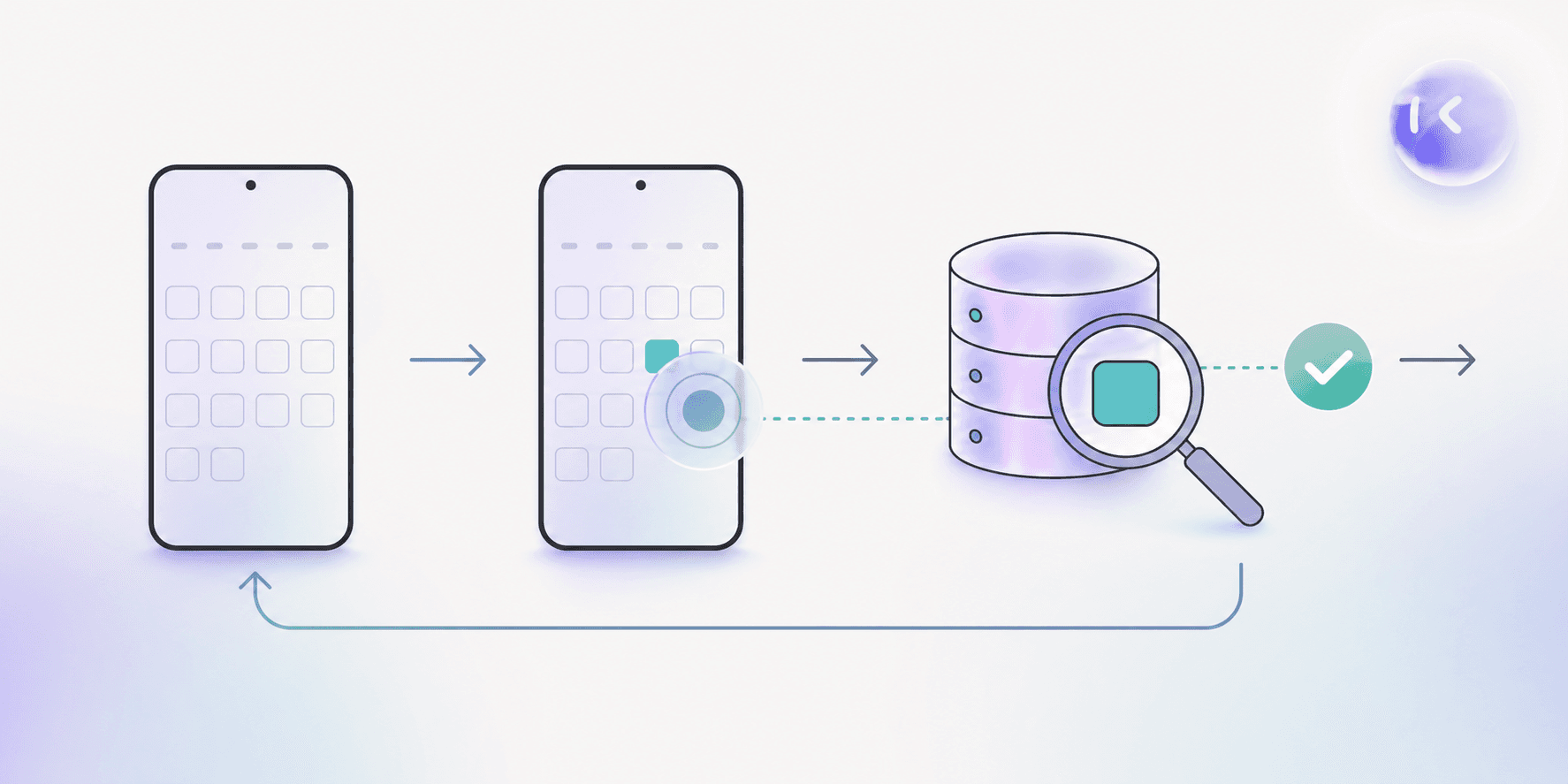
The AndroidWorld benchmark runs in a live Android environment. Each task has dedicated task lifecycle logic:
- Initialization prepares the device state for the task.
- Success-checking inspects that state for the requested outcome.
- Tear-down cleans up after the attempt.
An agent’s claim that it finished does not count as proof.
The benchmark gets its reward signals from system state, so passing requires the requested change to exist on the device. Task-defined setup and checks let research teams compare agents under the same conditions and success criteria, the same rigor that underlies how a mobile QA agent is assessed in production settings.
Which Apps And Tasks AndroidWorld Covers
The AndroidWorld benchmark covers everyday productivity and utility tasks, including:
- Calendar management, such as finding upcoming events.
- Note-taking tasks involving written content.
- Settings changes that alter device behavior.
- File management, including organizing stored items.
Task complexity varies. A settings change may take a short interaction; longer workflows require planning across screens, selecting the correct item, and preserving requested details through several actions.
That scope matters when interpreting results. The suite samples recognizable phone chores, but it does not capture the full range of daily phone use, including shopping and workplace communication.
How AI Agents Are Scored On AndroidWorld
Success rate is the primary metric in the AndroidWorld benchmark: the share of tasks an agent completes successfully. Read the attempt allowance alongside the score:
- pass@1 reports success on a single attempt.
- pass@k reports whether the agent succeeds within k attempts.
Extra attempts affect score comparisons. Task completion also differs from partial-credit grading, where unfinished work can earn points.
AndroidWorld\_SR labels success rate as a standalone leaderboard metric. For historical context, the original 2024 paper’s best baseline agent completed 30.6% of tasks, providing a reference point for progress since launch.
Setting Up And Running The AndroidWorld Benchmark
To run the AndroidWorld benchmark, start with its open-source GitHub repository. It uses an Android emulator and offers experimental Docker support. Follow the official installation documentation before connecting your agent.
The general flow:
- Set up the emulator and dependencies. Keep the configuration fixed for comparisons.
- Connect your agent to receive observations and send device actions.
- Run selected tasks, recording task selection and run settings.
- Review results and execution logs to investigate failed attempts.
Save the environment configuration with your results so another researcher can reproduce the run, much like assessing mobile testing tools with AI requires documenting the exact setup behind each result.
Current AndroidWorld Leaderboard And Top Scores
Public trackers list AndroidWorld benchmark scores in the mid-to-high 80% range, above the original baseline. These are reported results, not directly comparable rankings.
| Public tracker | Highest listed model | Reported score |
|---|---|---|
| LLM Stats leaderboard | Qwen3.8 Max | 85.3% |
| BenchLM November 7 snapshot | Qwen3.8-Omni-Flash | 87.1% |
Treat these as moving snapshots. BenchLM displays the values model providers publish, for reference only; the trackers list different entries. Agent scaffolding and tool access can affect scores for the same model. Check the tested configuration before treating a higher percentage as evidence of better performance.
Limitations And Criticisms Of The AndroidWorld Benchmark
As scores approach the ceiling, the AndroidWorld benchmark has less room to separate strong agents from exceptional ones. The MobileWorld paper's abstract cites recent agents exceeding 90% success as evidence of saturation.
Workflow length also matters, a consideration that also shapes how teams select among mobile application testing frameworks. The same paper reports that MobileWorld tasks require nearly twice as many completion steps on average: 27.8 versus AndroidWorld's 14.3. Longer sequences test whether an agent retains information between actions and recovers from mistakes. This motivates harder benchmarks built around extended, cross-app work that more closely reflects how people chain activities together on a phone.
AndroidWorld Compared To Other Agent Benchmarks
The AndroidWorld benchmark sits between simpler browser exercises and broader mobile suites. Each tests a different interaction environment.
- MiniWoB++ uses simpler, synthetic web tasks in the progression toward complex enterprise web workflows.
- AndroidWorld tests Android task execution, putting phone interaction at the center.
- MobileWorld expands to 201 tasks across applications, extending testing into cross-app workflows.
Before comparing leaderboard scores, match the environment to your question: browser interaction, Android task execution, or work spanning multiple apps, the kind of distinction worth understanding when assessing AI software testing tools. A percentage alone does not tell you which skills were tested.
What AndroidWorld Scores Do Not Tell You About Real-World App Quality
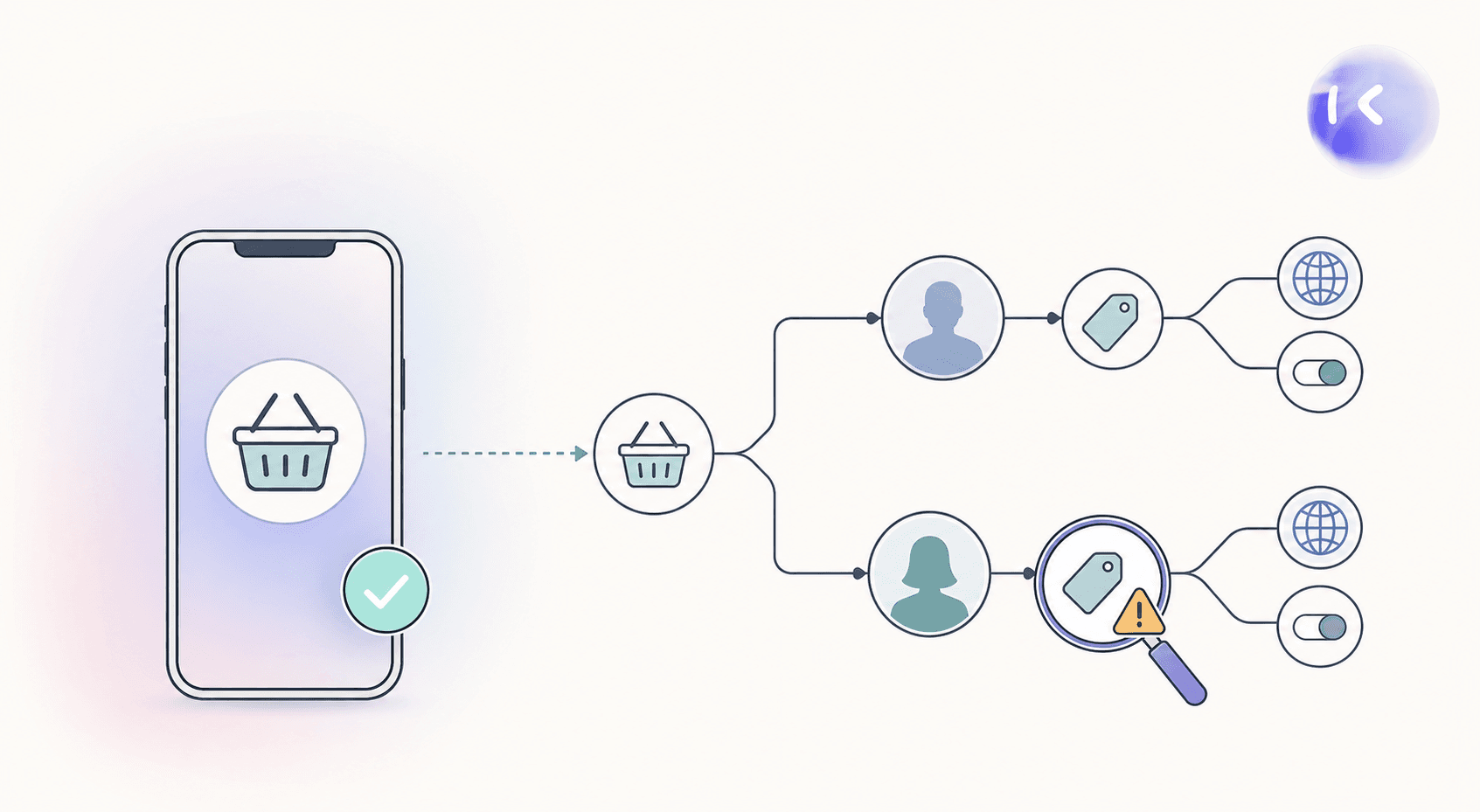
An AndroidWorld benchmark score does not measure regression detection, recovery from flaky test environments, or business-specific logic validation. For example, completing checkout leaves open whether an agent would catch a discount applied to an ineligible account.
For enterprise QA, ask for evidence against your acceptance criteria:
- Can the agent flag conflicting expectations between a ticket and a specification?
- Does it check behavior across geography and feature-flag combinations?
- When a dependency fails, can it distinguish a blocked test from an app defect?
These require product-specific testing evidence, not a benchmark percentage, which is why mobile automated testing in production environments looks so different from research benchmarks.
Minitap's Research On AndroidWorld And What It Comes From
Our open-source research project, mobile-use, tested whether AI agents could reliably control a phone. It solved the full AndroidWorld benchmark suite in January 2026; the paper followed shortly after, work that connects directly to practical QA automation for mobile apps. The code and results remain public for verification.
That result belongs to mobile-use. Minitap, our AI QA employee, applies interface-control capability to black-box visual regression testing on production apps across web, iOS, and Android, an approach to agentic testing that moves beyond scripted test cases. It understands product context and recommends next actions when blocked. This research informed how Minitap’s AI QA employee controls real interfaces.
FAQ
What should you ask Minitap to prove in a regression pilot beyond its AndroidWorld benchmark research?
Ask Minitap to test a critical journey against your acceptance criteria across selected account states, geographies, and feature flags. Include a known defect and an unavailable dependency so you can check the evidence and recommended next actions. Minitap runs black-box visual regression tests and provides a video of every run, giving your team product-specific proof beyond a research score.
Can you try Minitap on your existing regression cases without rewriting them as scripts?
Yes. You can upload existing test cases to Minitap as CSV or Excel files and edit scenarios and acceptance criteria in plain words. Start with a release-critical journey, such as checkout, and supply the expected behavior for eligible and ineligible discount accounts so the trial tests business rules, not merely task completion.
How do you compare AndroidWorld benchmark scores when agents have different retry budgets?
Compare scores with the same attempt allowance, task selection, and environment configuration; otherwise, treat them as separate results. For example, 90% pass@5 does not prove stronger first-attempt performance than 85% pass@1. For a Minitap purchase decision, pair benchmark research with regression runs against your own acceptance criteria: Minitap supplies run videos and findings your team can inspect.
Does Minitap test both iOS and Android apps, or just Android?
Both. Minitap tests iOS, Android, and web apps as part of the same regression suite. It runs black-box visual tests on real interfaces, so one Minitap setup covers mobile and web user journeys instead of limiting coverage to the Android-only scope that a benchmark like AndroidWorld tests. That gives your team one evidence-backed regression system across web, iOS, and Android, instead of stitching together separate tools per platform.
How is an autonomous QA agent like Minitap different from script-based mobile test automation?
Minitap is an AI QA employee that understands your product and decides what to test, instead of executing scripts your team wrote and must maintain. When your app's UI changes, Minitap proposes the needed test updates and asks your team to review only what it cannot settle on its own, instead of leaving selector rewrites and suite maintenance to your engineers. That difference matters for regression: your team gets video evidence and recommended next actions from every run without owning the script maintenance that slows releases.
Final thoughts on What AndroidWorld Measures
You get more from AndroidWorld scores by checking the setup and attempt limits. Your next step is evidence from actual app tests. See how Minitap supports regression runs with video from every test. When testing is blocked, Minitap surfaces the context and recommends next actions for team review. Minitap authors and executes tests, proposes test updates, and provides video evidence from every run.